- API integration connects two or more applications, so they can share data and automate work without manual efforts.
- A successful integration follows six steps: define requirements, review documentation, secure authentication, map data, test in a sandbox, then deploy and monitor.
- Core API integration best practices are RESTful design, versioning, security first, clear error handling, caching, rate limiting, and compliance planning.
- Enterprises select between point-to-point, ESB, microservices, event-driven, and iPaaS patterns based on scale and flexibility needs.
- Hardcoded credentials, missing error handling, over-coding, skipped data normalization, and tight coupling are the most common mistakes to avoid.
API integration best practices are essential for enterprise software. It is complex and requires documentation standards, usage limits and management of technical considerations. API integration is about more than connectivity. It enables technical teams to automate end-to-end processes and transfer data in near real time. Knowing how to execute an API integration effectively matters more than any other technical step.
APIs have significantly changed the way companies function and deliver value-added services to their customers. Businesses can easily build powerful ecosystems that deliver more core features and fast, smooth data transfer. Well-built APIs facilitate collaboration with partners and expert software teams. This open access leads to the development of value-added services and applications, improving customer experience, driving innovation, and creating new income sources. API integration is useful for connecting client applications with your system, as well as connecting internal systems.
This blog focuses on the API integration best practices for enterprise software to improve functionality and efficiency and deliver more value in software development.
First, let us understand what API integration is and its core value.
What Is API Integration?
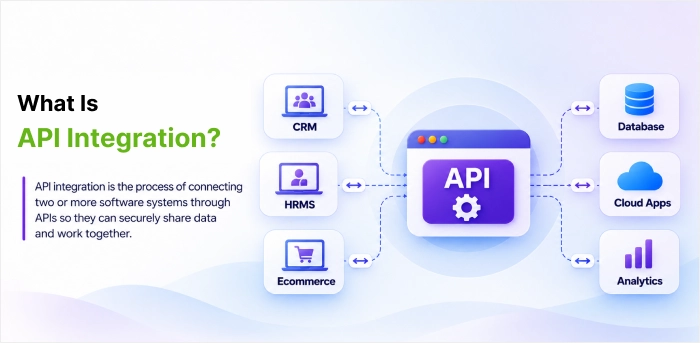
API integration is linking two or more apps together through their Application Programming Interfaces (APIs) to permit smooth communication and data exchange between the integrated software. APIs are essential components through which different software systems communicate with each other.
API integrations are, therefore, crucial for any organization since they allow process automation, boosting an organization’s productivity levels and minimizing the overall operational costs.
With the data exchange and process automation that API integration facilitates, businesses can achieve and maintain high performance while minimizing the need for human intervention. In addition, API integration helps organizations create new revenue streams by allowing the creation of effective ways of interacting with external organizations’ software, thus promoting idea exchange and giving businesses an insight into the operations of other entities.
Also, they play a crucial role in unlocking new revenue sources by allowing smooth interactions with third-party applications, thereby inspiring innovation and improving customer experiences.
In short, API integration is a solid base for creating connected ecosystems that support scalability, flexibility, and competitive advantage in today’s evolving business environment.
Common areas where API integrations are used:
- Logins on social media
- User accounts
- CRM systems
- Payments
- Tracking
Why Is API Integration Important?
API integration matters because it connects systems that would otherwise work in isolation, automates manual work, and breaks down data silos across the business.
In API integration, the focus increasingly shifts to an “API First” approach. This concept is about the establishment of the APIs as the foundational element of the application, which are deliberately created, developed, and tested before the production of the application’s UI or other secondary components.
This approach helps developers to ensure that all components are modular and have a standardized interface for smooth communication. So, the likelihood of inconsistencies and incompatibilities between components is remarkably minimized during production.
Also, the approach aids the flexibility principle, as developers can align many APIs to achieve a more efficient result.
For instance, a single API cannot satisfy all the necessary functions, but a combination of several APIs will provide the required result. Hence, developers can solve various problems, including incorporating payment processing systems, calculation tools, and other elements to enhance the performance of the application or software.
By simplifying these capabilities, API integration improves software functionality, accelerates development cycles, and allows scalable solutions that meet user requirements.
How Does API Integration Work?
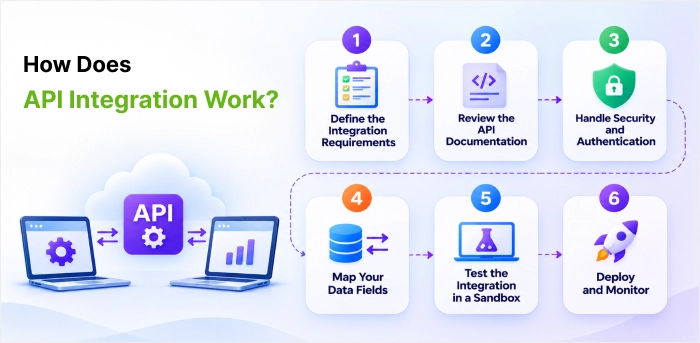
API integration refers to establishing continuous automated interaction between two or more applications by utilizing their Application Programming Interfaces (APIs).
In other words, APIs allow two different programs to communicate and share information without manually copying the data from one application into another. Once you understand what API integration is and how it works, the next step is execution.
Here is how to do API integration in six practical steps:
Step 1: Define the Integration Requirements
Before writing any code, clarify exactly what business problem the integration solves.
For enterprise projects, this groundwork is well managed during the software discovery phase. It is the stage where business stakeholders, architects, and developers agree on goals, map the systems involved, and highlight technical risks before development begins.
Treating API integration as part of this phase helps teams to find data gaps, security needs, and third-party limitations early, which keeps the build on budget and skips costly rework later.
- Find out the Data Flow: Find which systems are involved, which data fields need to move, and which direction they flow (one-way or two-way sync).
- Set Triggers and Actions: Define what event triggers the integration (e.g., a customer submits a signup form) and what should happen next (e.g., a new lead is created in the CRM).
- Determine the Frequency: Decide if data must be updated in real-time or via scheduled batches.
Step 2: Review the API Documentation
The API documentation is the instruction manual offered by the target application. You must carefully assess:
- Endpoints and Methods: Find the exact URLs you need to query. Check which HTTP methods they support, like GET (fetch data), POST (create data), PUT/PATCH (update data), or DELETE (remove data).
- Data Format: Confirm if the API uses JSON (most common), XML, or another data format.
- Constraints: Take note of rate limits (how many requests you can make per minute) and pagination rules for large datasets.
Step 3: Handle Security and Authentication
Most production APIs need credentials before they allow access.
- Create Credentials: Log into the provider’s developer console and make an API Key, Access Token, or configure OAuth credentials.
- Configure Headers: Safely pass these credentials within the HTTP headers of your network requests. Never hardcode sensitive API keys directly into front-end application code.
Step 4: Map Your Data Fields
Data structures rarely match perfectly between two different software platforms.
- Align Variables: Ensure a field like customer_zip in your system correctly translates and populates the postal_code field in the target API.
- Data Transformation: Write code to change data formats where necessary (e.g., transforming a MM/DD/YYYY date format into an ISO 8601 timestamp).
Step 5: Test the Integration in a Sandbox
Never test a brand-new API integration on live customer data.
- Use Mock Environments: Request access to a sandbox or staging environment offered by the API issuer.
- Manual Testing: Use dedicated API clients like Postman, Bruno, or cURL to manually trigger requests and analyse the exact responses coming back from the server.
- Error Handling: Intentionally force failures (e.g., sending bad data or hitting rate limits) to verify that your system replies gracefully using strategies like exponential backoff retries.
Step 6: Deploy and Monitor
Once the integration passes all test scenarios, push it to production.
- Live Deployment: Switch the API base URLs from the sandbox endpoints to the live production endpoints and apply the production credentials.
- Set Up Monitoring: Use logging tools to track system health, monitor latency, and trigger real-time alerts if error rates increase.
Benefits of API Integration
Benefits of API integration are given below:
- Offers high performance
API integrations perform well in several ways. For starters, data can move from app to app in a matter of milliseconds, enabling your employees and partners to access the data they need, as soon as they need it. Moreover, they’re resilient, as making changes to your applications’ UIs won’t affect your API integrations. And finally, they can be easy to set up and manage with a 3rd-party’s application connector. For instance, the 3rd-party’s connectors can account for any changes to APIs over time without disrupting the integrations they’re used in. - Enables innovative automations
API integrations can enable a variety of end-to-end automations.For instance, with the help of API integration, you can connect your ITSM tool (e.g. ServiceNow) to a storage solution (e.g. Amazon S3), a machine learning platform (e.g. Amazon SageMaker), and a business communication platform (e.g. Slack).Following intelligent automation is easy to implement upon connection:ServiceNow sends every ticket to Amazon S3, where Amazon SageMaker applies an ML model to classify it. Once classified, the ticket gets assigned to the appropriate helpdesk. The employees associated with that helpdesk also receive a Slack notification on the ticket, allowing them to become aware of the issue quickly and work on resolving it as soon as possible. - Fosters greater employee productivity
In the absence of integration, employees keep jumping between apps all day. According to a Harvard Business Review study, the average user toggled between apps and websites nearly 1,200 times a day, losing just under four hours a week reorienting themselves.Fortunately, API integrations can help by providing employees the data they need within the applications they regularly use. For example, someone in finance doesn’t need to log into your CRM to look up the sales rep for a given deal, as that field can be synced to your ERP system. - Reduces human errors
Forcing employees to copy and paste data between applications can lead to all kinds of issues, from inputting the wrong information to adding it to the wrong place. And while not every human error has significant repercussions, many do. For example, someone from finance can accidentally enter the wrong amount on a client invoice, leading to a bad customer experience.API integrations can help employees avoid the error-prone task of copying and pasting data, which enables them to minimize downstream errors. - Improves the employer’s reputation
Allowing employees to avoid tedious, time-consuming tasks around searching for information and copying and pasting data across applications doesn’t just benefit employee productivity and data integrity; it also helps you become a more attractive employer.Case in point: when Gallup surveyed thousands of professionals to better understand their criteria when evaluating open positions, they found that most professionals want to work in a role where they can spend more time on the projects, they’re best suited to perform. Also, many professionals are seeking a healthy work-life balance. - Enhances the customer experience
API integrations can directly benefit customers. For example, if you apply the ticket-classification automation outlined earlier to customer issues, your support team can resolve issues sooner.API integrations may benefit clients indirectly; employees freed from manual work can focus on serving customers better.
Key Challenges of API Integration in Enterprise Software
While API integrations remarkably simplify complex software development tasks, the teams responsible for making and maintaining these integrations normally face several challenges as follows:
- API Versioning
Issue: A significant number of API vendors regularly issue new versions of their products to add features and improvements. This means you need to upgrade your implementation to benefit from the new features.
Challenge: In many cases, such an update will need significant changes to your code and extensive testing to make sure that everything works properly. - Evolving APIs
Issue: The situation when the API is changing without a new version release is also possible since vendors sometimes alter the tool’s code to enhance its performance.
Challenge: These adjustments are often made, and you may not know about all the modifications. Thus, unversioned APIs and unexpected changes in their operation may disrupt your business, and you must be prepared for this eventuality. - Security and Authentication
Issue: Proper setup of authentication credentials is needed for secure API integrations, ensuring that applications can safely authenticate with third-party services.
Challenge: Securing data, credentials, and integration configurations against unauthorized access is vital, needing robust security measures and best practices. - Error Handling
Issue: Since API calls travel across separate networks and systems, there are many points where errors can occur.
Challenge: The error handling procedures must be established in case of API freezes or outages, and solutions must be designed to address such incidents. - Scalability
Issue: The use of a third-party API involves the application’s scalability and stability since your program’s overall performance depends on another organization’s capabilities.
Challenge: It is essential to ensure that your service is safe and scalable while working with the chosen solution. Besides, you must confirm the provider can handle your expected load. Otherwise, your operation may suffer from the API provider’s issues and insufficient capacity. - Testing
Issue: Ensuring that everything that uses the API works as intended needs extensive testing.
Challenge: Creating and maintaining test suites to ensure that API updates do not disrupt your application is necessary but time-consuming. - Knowledge Transfer and Documentation
Issue: Understanding the purpose and functionality of various APIs is not always clear, making long-term maintenance a challenge.
Challenge: Maintaining clear and comprehensive documentation is important for keeping developers informed and the sustainability of API integrations over time must be ensured.
To make API integrations successful and ensure that API-powered functionalities remain user-friendly and trustworthy, it is mandatory to effectively address these challenges. API integration best practices in software development mentioned in the next section will address these issues and optimize application’s performance and reliability.
API Integration Best Practices
Developers can produce and integrate APIs providing a smooth experience, inspire adoption, and stimulate innovation by following below explained API integration best practices. APIs are helpful in scaling customer experience. All these are vital best practices for creating and integrating an appropriate API:
- Adopt RESTful Design Principles
The industry standard for creating APIs is now RESTful API design principles. A RESTful API (Representational State Transfer Application Programming Interface) is an architectural style enabling many software applications to communicate and exchange data safely over the internet. It relies on the standard HTTP protocol to carry out operations on web resources. Instead of focusing on actions or verbs, REST looks at data as resources (like a user, a product, or an image), with each resource identified by a unique URL/URI.Developers can make intuitive, understandable and consistent APIs by adhering to these guidelines. - Set Versioning into Practice
The API versioning is an approach that is aimed at designing and developing methods for keeping a version updated and making it stable for existing users. Therefore, it is of paramount importance to implement the necessary versioning tactics for the proper functioning of the current integration. Versioning refers to the process of ensuring backward compatibility and smooth transitions for API clients that are based on an updated API. - Consider API Security First
A tight security constraint must be there, as APIs use and display much vital data and transfer it to various other applications. Use strong authorization and authentication processes, like JSON Web Tokens and API keys. The OWASP API Security Top 10 is a useful checklist of the most common API security risks to guard against. - Promote Developer Experience
The success and uptake of an API depend on a favourable developer experience. Add developer guides, interactive documentation API development tools (like Swagger), and code samples in deep, detailed and understandable documentation. - Design for Scalability and Performance
It’s critical to start with scalability and performance in mind as APIs become more famous and used. Apply load balancing, horizontal scaling, and caching techniques to manage rising workloads and traffic. - Put in Place Appropriate Error Handling
A trustworthy API and positive developer experience are all about handling errors efficiently. Return clear, descriptive error messages in the response payload with an appropriate HTTP status code to indicate the type of error but never expose stack traces or internal system details. - Encourage Code Reusability and Modularity
Consider such aspects while designing the APIs. Design them in a manner that allows decomposing the functionalities into microservices or smaller units for better scalability, easier maintenance, and the development of new functions with the help of existing building APIs. - Use API Gateways and Management Platforms
In complex microservices architectures, API gateway and management platforms give a centralized functions set for APIs to control and management. These programs offer rate limiting, traffic management, analytics, monitoring, and authentication features to make APIs secure, scalable, and reliable. This is where API integration and API management work hand in hand: integration connects your systems, while management keeps each connected API well governed, secure, and measurable. - Put Caching and Rate Limiting into Practice
Caching data which is regularly accessed can improve API performance and minimises server load. Apply various caching techniques, such as content delivery networks (CDNs), client-side caching, and server-side caching. Rate limiting, on the other hand, caps how many requests a client can send in a set time, protecting your servers from overload and abuse. - Iterate and Monitor ConstantlyUse API development as an iterative process and keep a watch on developer feedback, performance indicators, and usage trends. Utilise this data to pinpoint areas in need of development, optimise output, and adjust to variable demands and patterns. Update documentation, refactor code, and add new features or improvements regularly in response to user feedback and changing requirements.
- Ensure Data Governance and Compliance (GDPR, HIPAA, SOC 2)Most enterprise APIs serve sensitive data, so it is worth thinking about data governance early instead of fixing gaps later. Know what data each API touches and who really needs access to it, then lock it down with encryption, masking, and role-based permissions.GDPR and HIPAA regulations, along with SOC 2 audits, also expect proper audit trails and retention policies, so make them part of your API integration setup from the beginning. It saves you from compliance issues and gives customers and partners a strong reason to trust you.
Enterprise API Integration Patterns and Tools
As enterprises work with several apps, cloud services, and partner systems, the real challenge shifts from connecting them to connecting them perfectly. The API integration pattern you select determines how easily your systems scale, how well they recover when something fails, and how quickly you can adapt to new business needs. From simple point-to-point links to event-driven architectures and iPaaS platforms, each approach has its place.
Refer Enterprise API Integration Patterns and Tools individually now:
- Point-to-Point, ESB
Point-to-point integration links systems, which is useful for a few connections but quickly becomes unmanageable. IBM notes that custom code for each point-to-point link was expensive and made a complex web of interactions. An ESB like MuleSoft or IBM App Connect centralizes these connections and suits legacy-heavy setups, but without fault tolerance, it can become a single point of failure for the whole enterprise. - Microservices-Based Integration
To avoid the single point of failure issue, many teams now prefer microservices-based integration, where every service exposes lightweight APIs managed through gateways like Apigee or Kong. IBM observes enterprises moving toward a containerized, decentralized integration approach. - Event-Driven Architecture
Event-driven architecture (EDA) lets systems react instantly to business events, such as an “Order Placed” event triggering billing, inventory, and shipping at once. Emirates NBD is a good example. The bank paired Red Hat Fuse and Apache Kafka on OpenShift in 2019, letting its core banking apps and partner platforms exchange data in real time. - iPaaS Platforms
iPaaS platforms like Boomi and MuleSoft Anypoint Platform add cloud-based connectors and workflows on top. Many enterprises pair the two. Deutsche Bahn, for example, runs its passenger information platform on Apache Kafka and Confluent to process millions of real-time train events.
Quick Comparison among Various Patterns
Each API integration pattern solves a different issue, so the right choice depends on your scale, systems, and speed requirements. Some work best for a few simple connections, while others are built for real-time, enterprise-wide data flow. The table below compares how each pattern works, where it fits, and what to watch out for. Use it as a quick guide to pick the correct approach that suits your business.
| Pattern | How It Works | Best Suited For | Watch Out For | Example Tools |
| Point-to-Point | Links systems directly with custom code | A few connections | Becomes unmanageable and costly as links grow | Custom code |
| ESB | Centralizes connections through one bus | Legacy-heavy setups | Can become a single point of failure without fault tolerance | MuleSoft, IBM App Connect |
| Microservices-Based | Each service exposes lightweight APIs via gateways | Containerized, decentralized integration | Needs gateways to manage many APIs | Apigee, Kong |
| Event-Driven (EDA) | Systems react instantly to business events | Real-time workflows like orders and banking | Works best paired with iPaaS for connectors | Apache Kafka, Red Hat Fuse |
| iPaaS | Adds cloud-based connectors and workflows | Fast cloud and partner integrations
|
Often paired with event streaming for real-time needs
|
Boomi, MuleSoft Anypoint Platform
|
For teams without in-house integration expertise, partnering with experienced API integration services providers helps in getting the right pattern, setting up these tools, and avoiding costly rework later.
API Integration Use Cases
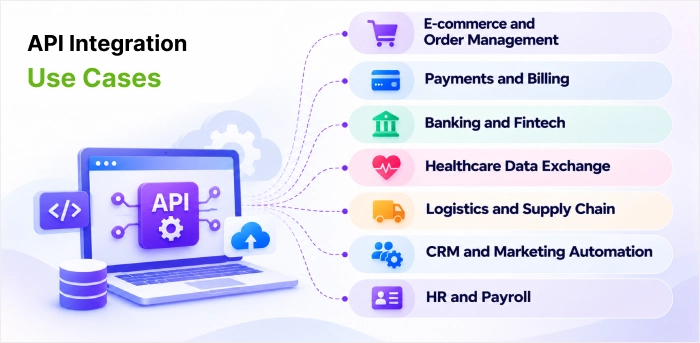
API integration shows its real value when it resolves a certain business problem. It provides enhanced and smooth customer experience to the end customers in the long run. It explores unmatched API capabilities in today’s changing business requirements. Here are the common API integration use cases across enterprise functions and industries:
- E-commerce and Order Management
Online stores connect their storefront with inventory, shipping, and accounting systems through APIs. When a customer places an order, stock levels update instantly, a shipping label is made, and the invoice reaches the finance system without anyone typing it in. - Payments and Billing
Businesses integrate payment gateway APIs into their checkout and subscription flows. This allows them to accept cards, wallets, and UPI payments, handle refunds, and send billing data to their ERP for reconciliation purposes. - Banking and Fintech
Banks and fintech apps use APIs to link customer accounts, verify identities, check credit scores, and share data with authorized partners under open banking rules. This makes instant loan approvals and account aggregation possible. - Healthcare Data Exchange
Hospitals and clinics connect Electronic Health Record (EHR) systems with lab, pharmacy, and insurance platforms using standards like HL7 FHIR. Doctors see test results and prescriptions in one place, while patient data remains protected under HIPAA. - Logistics and Supply Chain
Logistics companies integrate carrier, GPS, and warehouse management APIs to track shipments in real time. Customers receive live delivery updates, and operations teams can spot delays before they miss their deadlines. - CRM and Marketing Automation
Sales and marketing teams sync CRM platforms with their email tools, ad platforms, and website forms. A lead who fills a form gets added to the CRM, scored, and placed in the right email nurture sequence automatically. - HR and Payroll
HR teams connect their HRMS software with payroll, attendance, and recruitment platforms. A new hire’s details flow from the applicant tracking system into onboarding and payroll, which removes duplicate data and lowers processing time.
Examples of API Integration
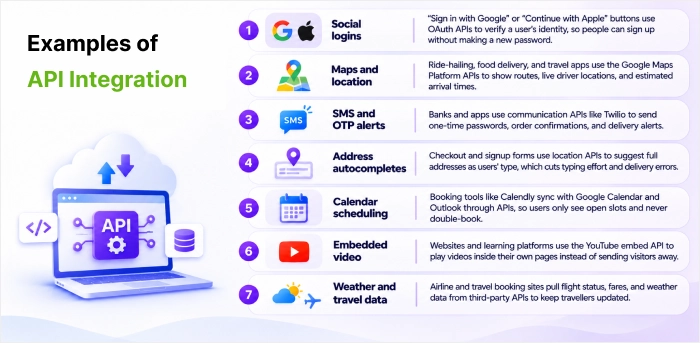
Think about the last time an app just worked for you. Maybe you signed in with one tap, tracked a parcel without leaving the page, or saw your payment go through in moments. These moments are so routine now that we barely notice them. Behind those easy moments, APIs are quietly pulling data, linking several services, and saving users from extra clicks and long forms. This makes user journeys faster and easier.
For anyone designing digital products, that’s where good UX really starts. Here are some everyday examples of API integration making those experiences feel effortless.
- Social logins: “Sign in with Google” or “Continue with Apple” buttons use OAuth APIs to verify a user’s identity, so people can sign up without making a new password.
- Maps and location: Ride-hailing, food delivery, and travel apps use the Google Maps Platform APIs to show routes, live driver locations, and estimated arrival times.
- SMS and OTP alerts: Banks and apps use communication APIs like Twilio to send one-time passwords, order confirmations, and delivery alerts.
- Address autocompletes: Checkout and signup forms use location APIs to suggest full addresses as users’ type, which cuts typing effort and delivery errors.
- Calendar scheduling: Booking tools like Calendly sync with Google Calendar and Outlook through APIs, so users only see open slots and never double-book.
- Embedded video: Websites and learning platforms use the YouTube embed API to play videos inside their own pages instead of sending visitors away.
- Weather and travel data: Airline and travel booking sites pull flight status, fares, and weather data from third-party APIs to keep travellers updated.
Common API Integration Mistakes to Avoid
Even well-planned API integration projects can stumble on small oversights that turn into big problems later. A hardcoded key, a missing retry or excessive use of custom code may seem like inconveniences during development; however, in an enterprise environment, such practices result in poor system security, dysfunctional processes, and difficult maintenance. On the other hand, most of these problems can be prevented with the right approach.
Here is the list of the most common API integration mistakes, along with their implications and suggested solutions:
| The Mistake | Why It’s a Problem | The Fix |
| Hardcoding keys and URLs | Leaving API keys in plain text or hardcoding URLs breaks easily when switching environments and risks leaking credentials. | Use environment variables or secret managers from day one to keep credentials secure and central. |
| Forgetting error handling | Assuming an API “just works” means minor network hiccups or rate limits will crash your app for the user. | Build for failure by adding automated retries with backoff and graceful error logging. |
| Over-coding everything | Writing hundreds of lines of custom glue code creates a “black box” that is tough to debug and maintain. | Use prebuilt connectors or visual workflow tools first, then drop in custom code only when truly needed. |
| Skipping data normalization | Passing raw, inconsistently formatted data directly downstream causes major bugs when an API structure changes. | Create a transformation layer to map and clean up data into a consistent format before passing it on. |
| Tightly coupling your logic | Bundling your API and integration into one service makes it impossible to update or scale one without breaking the other. | Keep it modular by separating concerns; let APIs handle features while a separate layer orchestrates the flow. |
Conclusion
This blog article has elaborated API integration best practices explaining sharing data of businesses with automation, reducing human efforts as well.
Apart from benefits of API integration, the blog also explains Microservices based integration and event-driven architecture approaches and the tools available for a successful API integration project.
It also describes fixing integration gaps, streamlining security actions in evolving business scenarios. Handling various error-handling tests and measures for data flow also works. More mistakes like over coding, tighter logic coupling and skipping data normalization also have fixes like use of pre-built connectors, modularity and transformation and cleaning of data.
This blog also covers real-world API integration use cases across payments, banking, healthcare, logistics, and HR, along with everyday examples of API integration like social logins, maps, and OTP alerts.
FAQs
How can enterprises prevent duplicate API requests and data inconsistencies?
Businesses / enterprises avoid duplicate API requests and data inconsistencies by using the combination of idempotency keys, distributed caching layers, database-level constraints, and client-side safeguards.
How can businesses keep API integrations secure?
To ensure API integrations are secure, companies implement a defence-in-depth approach to protecting data, access to data, and API traffic. A minor misconfiguration in an API can cause major vulnerabilities in connecting software applications that process sensitive data of customers.
How do you prevent API failures from disrupting business operations?
To prevent API failures from disrupting business operations, a comprehensive strategy must be put in place based on defensive software design, API and application monitoring and API failure fallbacks. Most businesses depend on APIs to connect the core systems of a business (e.g. payment processing and inventory management). Failure of an API can result in immediate financial losses and reputational damage.
How to update APIs with current integrations?
First, check which apps depend on the API and test the change in a sandbox before making it live. Integrations keep working and watch for updates announced by third-party providers on older versions under usage. Give teams enough notice to make changes before old endpoints are closed, so there is no sudden downtime.
How can enterprises improve API performance and avoid rate limits?
Enterprises can maximise their API performance and regularly avoid third-party provider rate limits by transforming from aggressive, real-time polling to efficient, stable architectures.


 Shaili Gupta


 Ajay Wadne