Key Takeaways
- Maintenance of software is the process of modifying your application such that it continues working effectively.
- Application support is where users get assistance regarding technical problems, accessibility problems, and any other questions regarding the application.
- Maintenance of application involves debugging, software update, optimization and modifications made to maintain compatibility.
- Support of the application includes troubleshooting and incident management.
- These two are necessary for any business organization to maintain its application.
Introduction
Developing and launching business software is only the beginning of its lifecycle. Once the deployment takes place, the application is usable for both the employees and customers. However, once the application is deployed in a business organization, errors, performance problems, security threats, and technical requirement changes are likely to arise.
For example, in case an employee management application is being deployed in a business, the employee would have problems accessing to their attendance and outdated data from the application. Some of these problems can be sorted using technical support while others require certain changes to be made.
Software maintenance refers to making modifications, updates and enhancements to the application. Support is provided to users of the application in software support.
The two processes are crucial in the software development process. While the two involve distinct roles and activities, the differences can help a business organization in handling technical problems, maintaining the performance of the application, and meeting the changing requirements of the users.
What Is Software Maintenance?
Software maintenance means changing, updating, and enhancing an application. This is done to ensure that the application keeps running effectively.
As a business grows, changes can be introduced to the application, including evaluating monolithic vs microservices architecture to support changing requirements. There may be a requirement for more users, integration with other platforms, enhancements to existing features, or security considerations. Software maintenance can be used to introduce changes like this.
For example: Where a business is using a payroll application. If there are any changes to statutory requirements, the development team will update the calculation process and run tests to ensure the payroll runs correctly.
For example: if the payroll application continues to make errors in computing overtime pay, then the maintenance group will investigate how the computation is made and correct the fault.
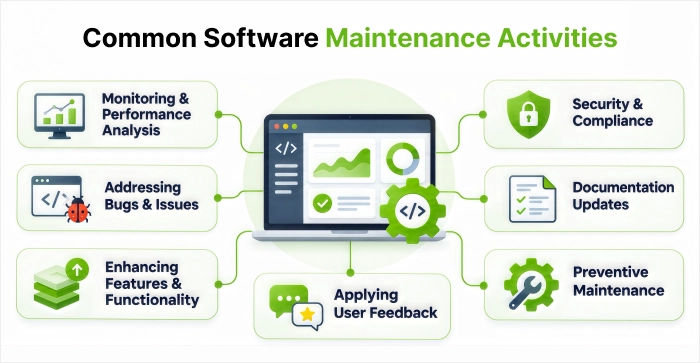
Common software maintenance activities include:
- Bugs and application fixes
- Outdated libraries, frameworks, and dependencies
- Make your application run faster
- Compatibility with new OS and database versions
- Install security patches and updates
- Expand existing functionality
- Rewrite existing code for ease of future modifications
- Make sure that your changes don’t interfere with existing functionality through testing
Maintenance of applications helps a business to extend the life cycle of its applications and minimize the problems associated with outdated applications.
Common Software Maintenance Activities
What Is Software Support?
Software support is technical support offered to users for any problems faced during the use of an application. Technical support services will include resolving technical problems and questions and providing help with maximizing benefit from the software application.
As compared to software maintenance, wherein modifications to the application are done, software support generally includes resolving technical problems of the users. The support team will investigate the problems, investigate the causes of such problems, and help the user find a solution to the problem.
For example, if an employee is unable to download his salary slip from the Employee Self Service site, the technical support staff can check the employee’s permission level, investigate the problem, and resolve the issue. If the problem is caused by a particular issue with the application, the problem can be referred to the development/maintenance team.
Common software support activities include:
- Troubleshoot login/access problems.
- Support users in understanding the application.
- Troubleshoot software configuration problems.
- Analyse errors and application crashes.
- Create technical incidents/questions.
- Provide support and guidance.
- Escalate application problems to the developers.
Application support will help employees make use of their applications without causing too much disturbance to their daily activities.
Software Maintenance vs Software Support: Key Differences
The primary difference between software maintenance and software support is that in software maintenance, changes are made to the program, whereas in software support, help is provided to users regarding their problems.
The following table compares both services across important business and technical areas.
| Comparison Factor | Software Maintenance | Software Support |
| Primary Purpose | Modify, update, and improve the application | Help users resolve software-related problems |
| Main Focus | Functionality, performance, security, and compatibility | User assistance, troubleshooting, and issue resolution |
| Nature of Work | Planned improvements, technical changes, and defect correction | Responding to reported issues and user requests |
| Typical Activities | Bug fixes, security patches, upgrades, and performance improvements | Login assistance, configuration help, and error troubleshooting |
| People Involved | Developers, maintenance engineers, and QA teams | Support engineers, help-desk teams, and technical specialists |
| Expected Outcome | A more reliable, secure, or capable application | A resolved user issue or answered technical query |
| Example | Updating an application to support a new database version | Helping an employee resolve an application access issue |
| Measurement | Software reliability, defect rates, and successful releases | Response time, resolution time, and user satisfaction |
The process of maintenance is where application software is made current and maintained correctly. On the other hand, the process of support is to make sure that there is user-friendliness for users.
They are mostly used hand in hand. Where the support team identifies certain issues with the application, they can then inform the maintenance team, who will fix the issue permanently.
What Are the Types of Software Maintenance?
Software maintenance is not simply about correcting errors. There may be other forms of software maintenance that may be done.
The four common categories of software maintenance are: corrective, adaptive, perfective, and preventive maintenance.
Four Types of Software Maintenance
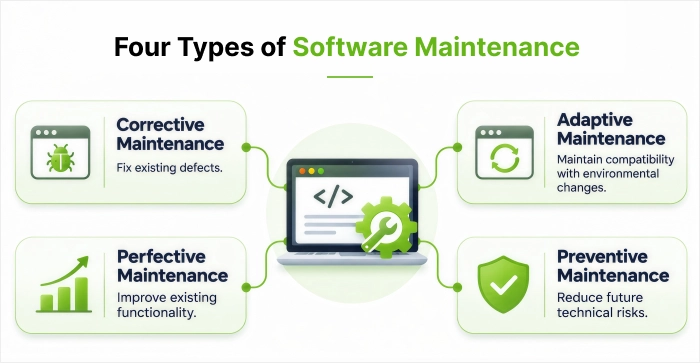
1. Corrective Maintenance
Corrective Maintenance is where problems or faults within the system are discovered after running the software, and they need to be sorted out. Problems such as calculation errors, running of the application, handling of data, etc.
For example, in a payroll system where the problem is found in calculation of an employee’s overtime pay, corrective maintenance will have to be carried out.
2. Adaptive Maintenance
Adaptive maintenance involves modifications to the software for it to function in the new environment.
This may involve changes to the operating system, database, hardware, API Integration, or regulations.
An example of adaptive maintenance would be when a company changes its database and therefore needs to make changes to its existing application.
3. Perfective Maintenance
The perfective maintenance is an upgrade to the existing software because of the users’ feedback or changes in business requirements. It can be done for the sake of improved performance or functionality, efficiency, or usability.
An example of such an activity can be upgrading the HR software to get more filters while searching for employees’ records.
4. Preventive Maintenance
Through preventive maintenance, there is improvement of the technical attributes of the system that can help prevent future failures.
For instance, some changes made include software refactoring, addition of new tests or updates on some dependencies that can help prevent future maintenance.
| Type of Maintenance | Main Purpose | Business Example |
| Corrective | Fix existing defects | Correcting an inaccurate salary calculation |
| Adaptive | Maintain compatibility with environmental changes | Updating software for a new database |
| Perfective | Improve existing functionality | Making employee searches faster |
| Preventive | Reduce future technical risks | Refactoring outdated code |
What Does Application Support Include?
Application support involves several activities that help users work with software and resolve technical problems. The exact responsibilities depend on the application, number of users, and support requirements.
1. Technical Troubleshooting
Analyze the issues with the application i.e. errors, failed transactions, login issues and any other issues that were unforeseen. Analyze the cause behind the issue and put in place the correct solution for the issue. Support teams will also analyze error logs and how the system is performing to understand the cause of any regular technical issues. If there are any changes required to the code this can be escalated to the development/maintenance team for further investigation.
2. User Assistance
Users may require assistance with the software application. Support staff can provide assistance for users by providing them with guidance on how to use particular features and find information. This will help users understand how to use the software to complete everyday tasks with less disruption to their work.
3. Incident Management
If an application problem affects the company’s operations, then it will be recorded by the support teams. The impact will then be assessed, prioritized, and solved.
For example: When employees of various departments cannot log into an internal software program then the support team may classify it as a high-priority incident.
4. Access and Configuration Assistance
Support teams provide user support for logging into accounts, managing permissions, configuration and other application requirements. They can also investigate if it is due to incorrect user configurations or technical issues.
5. Issue Escalation
If you have an issue that needs some coding, database or complex integration work then it might not be something that can be solved on the first level of support. These issues will be passed onto our developers/technical experts who will investigate why this is happening. They will identify the cause of the issue, implement any required changes and find a permanent solution. This helps stop any re-occurrence of the issue.
Why Do Businesses Need Both Software Maintenance and Support?
An application is one of the major components that are involved in business processes. Irrespective of whether it involves handling employees, transaction data, customer information, or reports. An application, when not managed properly, becomes inefficient and unreliable.
Here are five reasons why both services are important.
1. Reduce Business Disruptions
With the help of software support, you can address all the issues that users may have along the way. It allows you to handle all the problems in the software that can create future problems for you. It can benefit organizations a lot
2. Improve Application Performance
Performance will also decrease as more data storage increases and more users use the system. Working with the maintenance team, we can easily identify the bottleneck areas and increase performance.
3. Maintain Security and Compatibility
The needs for software dependencies, operating systems, and security will always change. With maintenance, a company will be able to ensure that they are always up to date with what it requires. Support teams can also help users by helping them report anything suspicious
4. Improve User Experience
Productivity improvement for employees through the provision of timely help and solving any problems related to application programs. Maintenance could improve usability and functionality.
5. Extend Software Lifespan
Replacing applications when there are any technical issues may incur high costs. Maintenance of applications would help organizations to update software applications to keep up with changing needs and help users utilize the applications fully.
How to Choose the Right Software Maintenance and Support Approach?
Before you think about how to deal with your application’s support, make sure that you examine the needs of your software. You need to make sure that you have the right system in place for managing the requirements of your application.
Consider the following factors:
- Understand application requirements during the software discovery phase: The software discovery phase helps you answer the key questions: What is the software for? How complex is it? What does it integrate with? How critical is it to your business?
- Evaluate user requirements: How many users will be using the application? What kind of support do they need from it?
- Define support availability: Is it necessary to provide working hours, extended hours, or 24/7 support for the system?
- Set response and resolution expectations: How fast do you want to respond to different types of issues raised?
- Review maintenance responsibilities: Would you like your support package to include bug fixes, security patches, software upgrades, performance enhancements and compatibility issues?
- Check escalation procedures: How complicated is the technical issue to pass to the developers or maintenance specialists?
- Consider scalability: Make sure that your strategy can accommodate with additional users, data, integrations, and requirements.
Organizations must take time to review their service agreement to clarify what is included, what constitutes additional software development, and how much support and maintenance they will provide.
Conclusion
Software maintenance and software support are two different concepts but interrelated to each other. Software maintenance includes modifications to software programs to make sure that they are updated, secure, and working properly. Software support makes sure that users get the assistance they require for solving issues, understanding the functionality of the application, and being able to continue their activities without much hassle.
While running your business, you need to distinguish between these two concepts. While your support team might help you fix the problems related to access to the application, any repeated problem with the application needs a long-term solution, which could be provided by your maintenance team. Proper distinction of these roles will enable you to deal with technical issues and improve the user experience.
FAQs
What Is the Main Difference Between Software Maintenance and Software Support?
Software maintenance is the process of modifying, upgrading and improving software to help it stay secure, reliable and adaptable to changing business needs. This can include fixing any bugs, adding security patches, enhancing performance and adding new features. Software support is when help is given to users to resolve technical issues, fix any errors and manage user access. Whereas software maintenance helps improve the application itself, software support helps users use the application.
Is Software Maintenance Part of Software Development?
Software maintenance is very important during software development life cycle (SDLC). Development does not end once a particular application is deployed. Developers monitor the performance of the application after deployment, correct any errors, upgrade current features and support new operating systems, databases and technologies. Software maintenance can help businesses to make sure their application can be modified to suit evolving requirements and increase its useful lifespan.
What Are the Four Types of Software Maintenance?
The four commonly recognised types are:
- Corrective maintenance: Fixing existing software defects.
- Adaptive maintenance: Updating software to work in a changed environment.
- Perfective maintenance: Improving existing features and performance.
- Preventive maintenance: Reducing the risk of future software failures.
Does Application Maintenance Include Bug Fixes?
Application maintenance does include the identification and analysis of software bugs within an application. This could be issues with calculations, unforeseen errors, broken features or data processing issues. Once the cause has been identified, the necessary changes will be made to the code by a developer. Testing will then be carried out to ensure that there are no issues. Regression testing is also often carried out to ensure that existing features have not been impacted by the changes.
Can Software Maintenance and Support Be Provided Together?
Yes, many providers will provide you with a package of maintenance and support. This means your business can benefit from having technical support to help your users, whilst also receiving regular updates to applications including fixing bugs, security updates and performance improvements. The support team can help employees login issues whilst the maintenance team will look into any recurring issues with the application. Having both services can help reduce downtime, provide more reliable applications and give you control over your software through the whole lifecycle.


 Shaili Gupta


 Ajay Wadne