Key Takeaways
- Plan for scalability early: Define workload expectations, performance targets, and future business requirements before development begins.
- Select the right architecture: Use modular design, suitable cloud infrastructure, and appropriate scaling methods to support growing workloads without unnecessary complexity.
- Optimise databases and integrations: Improve query performance, design efficient APIs, and manage data flow to prevent bottlenecks as usage increases.
- Prioritise security and continuous monitoring: Combine security controls, automated testing, and performance monitoring to maintain reliability as the application grows.
- Select the right development partner: Evaluate enterprise software solution companies based on their technical expertise, enterprise experience, maintenance capabilities, and long-term value to build scalable enterprise software solutions that support sustainable business growth.
Scalability is the foundation that makes this possible. Software must grow with the business, handling increased user loads, data volumes, and functional complexity without compromising performance or reliability.
This calls for development decisions accounting for future demands rather than focusing only on current requirements. The underlying architecture must allow businesses to introduce new features, support additional users, and manage expanding workloads without disrupting current operations.
It should also accommodate changes in technology and business processes as they emerge. A forward-looking development approach support in avoiding frequent system modifications and makes sure for the software remains capable of supporting long-term business growth.
This article delves into the critical principles and practices for building scalable enterprise software, highlighting how a leading software agency or service provider can lead you to the best solution.
What Is Scalable Enterprise Software?
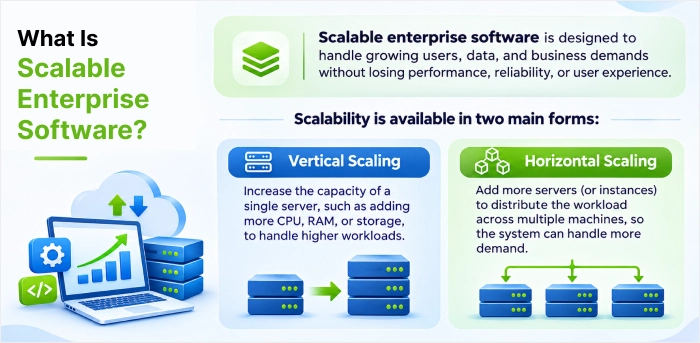
Scalable enterprise software is designed to handle users increment, transactions, data volumes, and business operations while maintaining acceptable parameters.
For example, an enterprise resource planning (ERP) system can initially serve one office. As the organisation excels, it may need to support various locations, additional departments, more tough approval workflows, and connections with external applications.
A scalable system can accommodate these requirements via planned changes to its architecture, infrastructure, and data handling.
Scalability is available in two main forms:
- Vertical scaling: Increasing the resources available to a current server, like its processing power or memory. Vertical scaling can be suitable for certain workloads, especially when the application or database benefits from a large individual machine.
- Horizontal scaling: Adding more servers or application instances to distribute workloads across many resources. Horizontal scaling can offer great flexibility for workloads that can be distributed across multiple instances, although it introduces additional design and operational considerations.
The appropriate approach relies on the application’s workload, architecture, availability requirements, and budget. There is no single scaling model working equally well for each enterprise application.
Scalable vs Non-Scalable Enterprise Software: Key Differences
In actual, these two enterprise systems can look almost identical. Both handle daily operations, support your teams, and run smoothly when usage is steady. The real difference shows up when your business grows, so that means more users, more data, new markets, or new integrations. Scalable enterprise software adapts to that growth seamlessly, while non-scalable systems start to slow down, break, and drain your budget. Refer the factor wise comparison given below:
| Factor | Scalable Enterprise Software | Non-Scalable Enterprise Software |
| Architecture | Modular, microservices, or cloud-native | Monolithic and tightly coupled |
| Performance Under Load | Stays stable during traffic spikes | Slows down or crashes as usage grows |
| Infrastructure Cost | Pay for what you use, scale on demand | Costly hardware upgrades and over-provisioning |
| Adding New Features | Quick, with minimal disruption | Slow, risky, and often needs major rework |
| Integrations | API-first, connects easily with new tools | Limited, requires custom workarounds |
| Downtime | Minimal, with failover and redundancy | Frequent, especially during upgrades |
| Long-Term ROI | Grows with the business | Becomes a liability that needs replacing |
In short, scalable enterprise software is built for where your business is going, while non-scalable systems are built only for where it is today. That gap is exactly what creates the problems we’ll look at next.
Problems Enterprise Software’s Face without Scalability
Scalability isn’t just a technical term. It is fundamental need also. Software can not become a bottleneck, hamper growth and take to a spectrum of problems.
They are as follows:
- Increased Costs: Over-provisioning resources or constant refactoring to address growth can be strictly expensive.
- Lost Opportunities: Inability to monitor peak demand (e.g., during sales events for e-commerce) translates directly into lost revenue.
- Business agility: Without scalability built-in, evolving business needs necessitate costly and time-consuming overhauls.
- Performance Degradation and Poor User Experience: Slow load times and unresponsive interfaces confuse many users and employees, resulting in decreased productivity, customer churn, and a damaged brand reputation.
Building scalability from the start usually costs less than retrofitting it later, which is why experienced development partners plan for growth in the software discovery phase.
Key Benefits of Scalable Enterprise Software Solutions
Scalability does more than keep an application running under heavy load. When software is built to grow, businesses gain remarkable advantages in cost, performance, and resilience.
Here are the key benefits:
- Cost efficiency: Usage-based infrastructure replaces large upfront hardware purchases, so businesses stop paying for idle capacity.
- Consistent performance under load: Resources are added during peak demand and released later, maintaining response times stable as users and data grow.
- Business agility: Systems adapt to new features, markets, and usage patterns without a full redesign, so teams can start small and expand whenever needed.
- Higher reliability and faster recovery: Spreading workloads and data across servers, zones, or regions helps applications withstand hardware failures and traffic spikes and recover soon from outages.
- Operational efficiency: A well-structured, scalable system reduces architectural complexity, so one IT team can support more projects on the same foundation.
- Fast access to innovation: Teams can try managed databases, analytics, and machine learning services without committing to permanent infrastructure.
- Long-term competitive advantage: Scalable systems support sustained growth and consistent performance for users in several locations, without the business building its own data centres.
How to Build Scalable Enterprise Software: 8 Steps
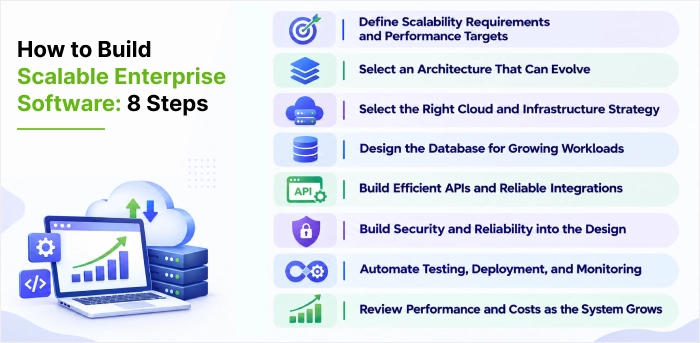
Building scalable enterprise software isn’t about adding more servers when things lower. It starts very early, with the decisions we make around goals, architecture, data, and infrastructure before a single line of code is written. Get these foundations right, and the system grows smoothly alongside the business. Getting them wrong, will find more years of delays and performance drop.
The eight steps below brief with a practical, proven approach to build scalable enterprise software that is reliable, fast and cost-efficient as users, data, and operations grow further.
Step 1: Define Scalability Requirements and Performance Targets
Scalability starts with clear, measurable targets, not with technology choices. Before development begins, document:
- Expected number of users, including peak concurrent users.
- Transaction and request volumes at normal and peak load.
- Target response times for important workflows.
- Required service availability and recovery objectives.
- Expected data growth over the next few years.
- Infrastructure budget and operating cost limits.
These targets give architects and developers a practical basis for assessing design decisions. Microsoft’s Azure Well-Architected guidance similarly recommends defining performance targets, planning capacity, and measuring application behaviour against set baselines.
Step 2: Select an Architecture That Can Evolve
Software architecture sets how easily an application can accommodate additional workloads, features, and integrations.
For many enterprise applications, a modular architecture is a practical starting point. It separates major business functions into well-defined components while keeping the overall system manageable.
A monolithic application can still be scalable when its workload and design permit it. However, tightly connected components may make independent deployment or scaling more difficult as the application grows.
A microservices architecture takes a different approach by dividing functionality into independent deployable services. For example, an enterprise platform may separate user management, billing, reporting, and notification processing into distinct services when the business and technical requirements justify doing so.
Microservices can help independent scaling and releases, but they also introduce service communication, monitoring, deployment, and data consistency challenges. They should not be adopted simply because an application needs to scale.
Step 3: Select the Right Cloud and Infrastructure Strategy
Infrastructure must support the application’s anticipated workload while allowing capacity to change when demand increases or decreases.
Cloud platforms such as AWS, Microsoft Azure, and Google Cloud offer options like managed databases, container orchestration, load balancing, and automatic scaling. These services may reduce some operational responsibilities, although they still need appropriate configuration, monitoring, and cost management.
For instance, an application can use a load balancer to distribute incoming requests across multiple application instances. Autoscaling policies may then add or remove instances based on suitable workload indicators, offered the application and its dependencies support that behaviour.
Step 4: Design the Database for Growing Workloads
Database performance can become a major constraint as an enterprise application processes more transactions and stores more information.
A database performs adequately during initial development may struggle when tables grow, queries become more tough, or multiple users access the same resources concurrently.
Database design must reflect actual access patterns and business requirements. Teams must assess data models, query efficiency, indexing, connection management, and transaction behaviour before making infrastructure changes. Choose between SQL and NoSQL databases based on data structures and access needs. NoSQL databases often excel at handling large volumes of unstructured data and high-velocity writes.
Step 5: Build Efficient APIs and Reliable Integrations
Enterprise applications rarely operate in isolation. They exchange information with CRM platforms, ERP systems, payment services, analytics tools, identity providers, and third-party applications. As integrations increase, inefficient API design can affect the performance of the entire system.
Start by defining clear API contracts, appropriate authentication and authorisation, input validation, and consistent error handling. Avoid returning unnecessary data or impelling clients to make excessive requests to do a single workflow.
For workloads involving lengthy or resource-intensive tasks, asynchronous processing may reduce the time, users spend waiting for a reply. A message queue, for example, can accept a task for later processing while the application confirms that the request has been received.
Step 6: Build Security and Reliability into the Design
Enterprise software mostly handles confidential customer information, employee records, financial transactions, and business-critical processes. As usage increases, security and reliability must remain central to the architecture.
Security controls must be considered during design and development rather than added after the application is complete.
Important measures are role-based access controls, encryption in transit and at rest where appropriate, secure secrets management, dependency updates, audit logging, and regular security testing. Organizations must assess applicable regulatory and contractual requirements.
Reliability needs a separate, but related decisions set. Applications must have defined backup procedures, recovery objectives, health checks, and incident response processes.
Where appropriate, teams may use redundancy, fault isolation, and graceful degradation to avoid one failing component from disrupting each business function.
For example, if a non-critical reporting service becomes unavailable, the main transaction workflow may still be able to operate. Whether this is possible depends on how dependencies and failure handling are designed.
The aim is to make sure that additional users and workloads do not make the system hard to secure, operate, or recover.
Step 7: Automate Testing, Deployment, and Monitoring
A scalable architecture wants a development and operations process keeping pace with change.
Manual deployments and inconsistent testing become harder to manage as an application grows. Automated build, test, and deployment pipelines helping teams introduce changes more consistently and identify problems before they affect users. Deployment strategies like rolling, blue-green, or canary releases allow updates with minimal or no downtime.
Google’s DORA research offers four key metrics, covering both the throughput and stability of changes, for tracking whether delivery is improving. Performance testing must include realistic workload patterns, not just a brief test with a small number of users.
Step 8: Review Performance and Costs as the System Grows
Scalability is not a one-time development milestone. Application usage, data volumes, business priorities, and infrastructure costs change with time.
A system performing well today may develop bottlenecks after new features, integrations, or reporting requirements are introduced. Regular reviews help teams address these changes before they become persistent operational problems.
Review application performance against the targets set during planning. Examine slow database queries, underused infrastructure, repeated API calls, expensive background jobs, and components experiencing disproportionate demand.
Teams must evaluate the scaling cost for individual services. Adding resources may boost performance, but it may not be very effective solution if the underlying issue is inefficient code or an unsuitable data access pattern.
A regular review should answer three questions:
- Which components are approaching their capacity limits?
- Which changes would improve performance or reliability most effectively?
- Can the expected improvement justify the implementation and operating costs?
This process helps Organizations to improve their scalable enterprise software solutions as real requirements become clear, rather than investing in infrastructure based on assumptions alone.
Scalability Readiness Checklist
Before you invest in more i.e. multiple servers, a new architecture, or a development partner, check whether your application is ready to grow. These ten questions cover the eight steps above, from planning and architecture for testing and cost reviews.
Answer each one with a yes or no. Every “no” points to the step that needs attention before you scale your scalable enterprise software further.
| No. | Readiness check | Area | Related step |
| 1 | Are performance targets and SLOs documented for key workflows? | Planning | Step 1 |
| 2 | Have peak user and transaction volumes been estimated? | Planning | Step 1 |
| 3 | Is the architecture choice justified by workload and team capacity? | Architecture | Step 2 |
| 4 | Can the application run as multiple instances behind a load balancer? | Infrastructure | Step 3 |
| 5 | Are autoscaling and cost alerts configured? | Infrastructure | Steps
3 and 8 |
| 6 | Are slow queries profiled and indexes reviewed against real data volumes? | Database | Step 4 |
| 7 | Do integrations use timeouts, controlled retries, and circuit breakers? | Integrations | Step 5 |
| 8 | Are backups, recovery objectives, and incident response tested? | Security and reliability | Step 6 |
| 9 | Do load, stress, and endurance tests run before major releases? | Testing | Step 7 |
| 10 | Are performance and costs reviewed on a regular schedule? | Optimization | Step 8 |
How to read your score:
- 8 to 10 “yes”: Your application is prepared for growth. Focus on regular reviews.
- 5 to 7 “yes”: Attain the gaps before your next major growth phase.
- Fewer than 5 “yes”: Scaling now is likely to cause performance or cost problems. Start with Steps 1 and 2.
Common Challenges When Building Scalable Enterprise Software
Building scalable enterprise software involves more than choosing the right architecture or adding computing resources. As applications grow, development teams can face performance bottlenecks, integration issues, rising infrastructure costs, and security concerns. If not addressed early, these problems may reduce application reliability and make future upgrades difficult. These problems may affect application trustworthiness and make future upgrades tough, if they are not addressed early.
| Challenge | Why it matters | Practical response |
| Poorly defined requirements |
Capacity decisions may not reflect actual business needs. |
Set measurable workload and performance targets. |
| Overly complex architecture | Additional services increase maintenance and operational demands. | Start with a manageable design and introduce complexity when justified. |
| Database bottlenecks | Slow queries and contention can affect the whole application. | Profile queries, review indexes, and test realistic data volumes. |
| Unreliable integrations | A failing dependency can interrupt critical workflows. | Add timeouts, controlled retries, monitoring, and fault-handling mechanisms. |
| Insufficient testing | Performance issues may appear only under production-like workloads. | Conduct load, stress, and endurance testing. |
| Uncontrolled infrastructure growth | Additional capacity may increase costs without addressing root causes. | Monitor utilisation, review scaling policies, and optimise bottlenecks. |
| Security gaps | Greater usage and more integrations can increase exposure. | Apply access controls, secure configuration, and ongoing security testing. |
These challenges are connected. For instance, adding application instances may not resolve a database bottleneck, and splitting an application into more services may increase latency if communication between those services is inefficient. Effective scaling depends on identifying the actual constraint before selecting a solution.
How to Choose Enterprise Software Solution Companies
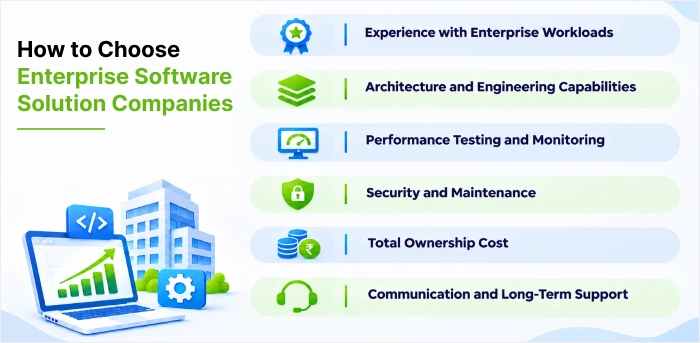
Building scalable software requires technical expertise as well as an understanding of business operations. Organizations evaluating external development partners should look beyond marketing claims and assess whether a provider can design, deliver, and maintain software as requirements change.
When comparing enterprise software solution companies, consider the following factors.
- Experience with Enterprise Workloads
Ask for relevant project examples involving high transaction volumes, complex integrations, large datasets, or multiple business units. Search for evidence of how the provider handled performance constraints and reliability requirements.
- Architecture and Engineering Capabilities
Evaluate the team’s experience with application architecture, databases, APIs, cloud infrastructure, automated testing, and security. Ask how the company decides between monolithic, modular, and microservices architectures rather than assuming one approach is always best.
- Performance Testing and Monitoring
A capable development partner should explain how it establishes performance targets, tests application behaviour, identifies bottlenecks, and monitors production workloads.
- Security and Maintenance
Check how the provider handles access controls, vulnerability management, backups, incident response, documentation, and ongoing maintenance. These responsibilities remain important after the initial release. Independent quality certifications, such as ISO 9001 or a CMMI appraisal, provide further evidence of mature processes.
- Total Ownership Cost
Compare development costs alongside hosting, licences, support, upgrades, monitoring, and future enhancements. A lower initial quotation may not represent the lowest long-term cost if the solution is difficult to maintain or extend.
- Communication and Long-Term Support
Clarify project ownership, delivery milestones, documentation standards, support arrangements, and responsibility for future changes. Enterprise software often requires ongoing collaboration between the internal team and its implementation partner.
Verified client reviews on platforms such as Clutch or Good Firms show how a provider communicates in practice.
The best enterprise software solution companies for a particular organisation are those that can demonstrate relevant experience, explain their technical decisions, and align the solution with measurable business requirements. A company’s size or brand recognition alone does not establish that it is the right fit.
Verified client reviews on platforms like Clutch or Good Firms show how a provider communicates in practice.
Best Practices for Building Scalable Enterprise Software
Following the right development practices help businesses to handle cater growing workloads, integrate new systems, and maintain application reliability while keeping costs under control.
From selecting a suitable architecture to implement robust security and continuous monitoring, each decision must support current operations while allowing room for future growth.
- Start with business goals: Technology should solve clearly identified business problems.
- Plan for maintenance: Enterprise applications need ongoing updates, security improvements, bug fixes, and feature enhancements.
- Listen to users: Employee feedback may identify workflow problems that cannot be obvious during technical planning.
Conclusion
Scalability is not something you rely on later. It’s a choice you make from the start. As we’ve discussed in this blog article, scalable enterprise software gives the business room to grow, whether we grow up, scale out, or do a bit of both. Without it, businesses are going to stuck with slow systems, frequent downtime, and ever rising costs. With it, you get best performance, easy integrations, and software aligned with your plans.
It’s achievable. Follow the right steps, implementing of proven best practices, and tackle common challenges before they turn into real problems. Use the readiness checklist to see where we stand today and take time selecting an enterprise software development company that understands your growth goals. Get this correct, and the software solution will drive the business apart from supporting.
FAQs
What is enterprise software?
Enterprise software is those software’s built for organizations rather than individual users. Common examples are ERP, CRM, HR management, supply chain, and business intelligence systems. It mainly supports many users and departments, integrates with other business systems, and covers role-based access, security controls, and administration features that consumer software is lagging.
How much does enterprise software development cost?
This will depend on the complexity of your application, features, number of integrations, technologies, development time, level of security and maintenance required.
Why is enterprise application architecture important?
This will outline how each part of your enterprise software will work together and scale. This can improve performance, security, and makes it easier to keep your software up to date.
Why would a business require enterprise software?
To automate processes, increase efficiency and scale globally. Enterprise solutions allow businesses to avoid silos, automate repetitive tasks and scale efficiently.
What is software scalability, and how is it different from elasticity?
Software scalability is a system’s ability to handle more users, data, or transactions by adding resources, without losing performance. Concept of Elasticity means resources adjust automatically to short-term demand, like a traffic spike, and shrink back afterward. A system may be scalable without being elastic, but elastic systems must be scalable.
What is scalability testing?
Scalability testing shows you what happens to your application as demand grows. Testers gradually increase users, transactions, or data volume while tracking response times, throughput, and resource usage. It helps you spot the limit where extra resources no longer improve performance, so you can fix it before your customers run into it.


 Shaili Gupta


 Ajay Wadne