Key Takeaways
- Software testing is performed to find faults before releasing enterprise applications.
- Applications are tested with functional, performance and security testing to verify the application requirements.
- User acceptance testing verifies the software fulfils the organization’s needs.
- It is used to verify that any modification made does not affect the previous functionality.
- Deployment readiness tests avoid unnecessary production issues.
Introduction
Using enterprise software without proper testing can create difficulties in running your business’s daily operations. Failures of applications, security risks, high latency, and integration problems can be felt not only by your staff but also your customers once the software has gone live.
For example: An enterprise software that is functioning correctly in development, but for some reason, it takes too long to load when a lot of employees use it. Also, an integration issue may prevent you from moving data between integrated systems.
Testing before deployment: Software testing is performed before an application enters the production environment to identify defects. The checklist for software testing will help QA engineers to test functionality, security, reliability, and performance of the software.
Think about the best practices for incorporating an API into your enterprise software application. It is important to conduct QA to ensure that your application can work together with external platforms and third-party services. This process includes testing that the API functions well, responds correctly, authentication is successful, and errors are handled properly. It is necessary to check whether the application works fine even when one of the services stops working.
What Is Software Testing Before Production?
Pre-production software testing is the activity of testing the software application in the testing environment to ensure that the product meets business and technical specifications.
This involves testing the application features, integration, user authentication, data integrity, and performance of the system identified during the software discovery phase. For enterprise applications testing, some business processes and working of related systems should be tested too.
For example, before deploying an ERP application, each application module of finance, inventory and procurement should be checked if these modules interact with each other.
Best practices should be followed during the pre-production phase while incorporating APIs in the enterprise software. Since most enterprise applications depend on external services, QA needs to verify that various versions of the API are compatible with the application. It is also required to ensure that the incorporation of new services does not impact existing processes. In addition to that, it is necessary to consider factors like API documentation, response format, rate limits, and dependency on services. In case the ERP system is integrated with payment gateway services, it must be validated in terms of compatibility with the API.
Why Is Software Testing Important Before Production?
Pre-production testing can identify issues before they impact business operations.
- Prevention of operational disruptions: Detecting potential errors that might affect business operations.
- Protection of sensitive information: Determining whether security controls for application data and user accounts are adequate.
- Optimizes performance: Detects slow system response time and system bottlenecks.
- Verifies business requirements: Checks that each feature works the way they should.
- Reduces production fixes: Facilitates fixing of bugs before release.
What Should an Enterprise Software Testing Checklist Include?
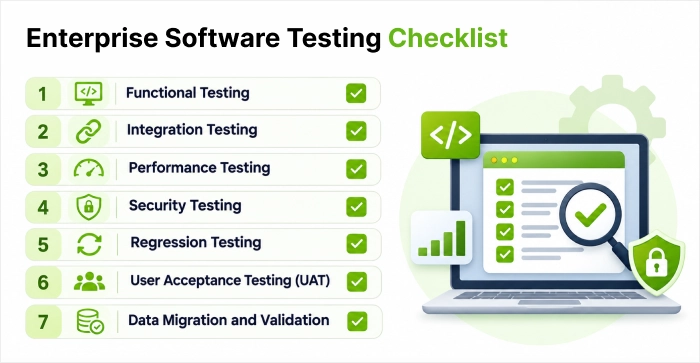
The criteria for an enterprise software testing should be as follows.
1. Functional Testing
Functional testing ensures that the application functionality meets the specifications provided.
- Login, logout, and registration functions work properly.
- Input forms accept valid input and reject invalid input.
- Workflows of businesses follow the expected process.
- Calculations and reports show proper results.
- Error messages are displayed where necessary.
- Users can perform their assigned activities.
2. Integration Testing
Integration testing checks the data transfer between integrated applications, API integration, and databases.
- The APIs deliver responses as expected.
- Data transfer to connected systems is accurate.
- Inter-service authentication is successful.
- Handling of transactional failures.
- Detection of duplicate/missing records.
- An error is recorded during integration.
3. Performance Testing
Performance testing tests the behaviour of an application under different workloads to support building scalable enterprise software, whether it follows monolithic vs microservices architecture.
- Application response times are in line with set expectations.
- System is able to handle expected number of users simultaneously.
- High-volume transactions are processed accurately.
- Database queries operate at an efficient pace.
- CPU usage and memory usage stay within expected range.
- The application can handle maximum workload efficiently.
Load testing deals with anticipated user load, whereas stress testing takes into account the behaviour of systems outside of normal operating conditions.
4. Security Testing
Security testing identifies vulnerabilities that could allow unauthorized users to access sensitive business information.
- Access control and authentication are functional.
- The functions that the user has permissions to use can be accessed.
- Security of sensitive information is ensured.
- Input validation is tested for any vulnerabilities.
- Session management is secure.
- Dependencies are scanned.
- Security vulnerabilities are addressed before release.
5. Regression Testing
This test ensures that there is no impact on an existing functionality for all the latest updates made.
- Previously working features continued to function.
- Critical business workflows pass testing.
- Related modules are tested after code changes.
- Previously fixed defects do not reappear.
- Automated regression tests run successfully.
6. User Acceptance Testing (UAT)
User acceptance testing is conducted to verify that the software fulfils the needs of the business and can perform actual business processes.
- Business requirements are covered by test scenarios.
- Relevant departments participate in testing.
- Users can complete important tasks.
- Reports and outputs meet business expectations.
- Reported issues are resolved or formally accepted.
- Business stakeholders approve the application for release.
7. Data Migration and Validation
The team needs to verify whether the data is accurately transferred when replacing existing software during legacy software modernization.
- Required records are migrated successfully.
- Record counts are checked before and after migration.
- Important fields and relationships are preserved.
- Duplicate and incomplete records are identified.
- Data formats and calculations remain accurate.
- User permissions are maintained after migration.
How to Prepare Enterprise Software for Production?
All functional and technical requirements must be verified by the teams to make sure that the enterprise application software satisfies all of the requirements. Set up a test environment and conduct tests for functionality, integration, performance, security, regression, and user acceptance testing. In case there are critical issues identified, then they need to be recorded, prioritized, and resolved.
Testing will be complete and after this, all teams need to ensure that there are no issues regarding production setup such as configurations, user rights, monitoring, backup, and rollback procedures. There should also be approval for release by the right stakeholders. After the deployment of the solution, the teams will have to monitor its performance.
Testing plan should be included in the legacy software modernization strategy for enterprises. The QA department will ensure that the functionality is working properly and that the compatibility of your current applications will be examined. Testing will be done for the following areas: legacy integrations, browser compatibility, and database connectivity and compatibility with the existing technology. Any functionality affected by the modernization process will need to be tested for regression.
What Common Software Testing Mistakes Should You Avoid?
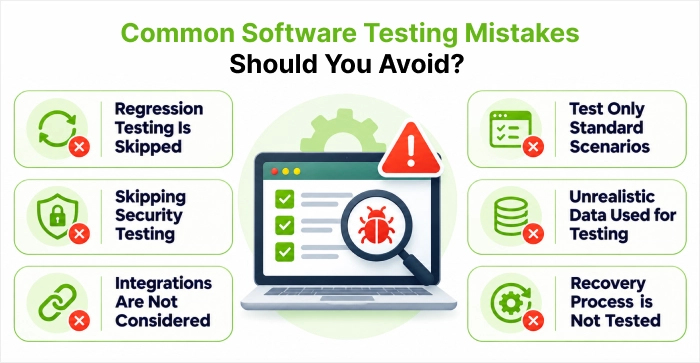
There are some frequent errors which can overlook certain defects before production.
- Regression Testing Is Skipped: The new software update might impact those features which are already working fine.
- Test Only Standard Scenarios: Invalid input and failed transaction may uncover other flaws.
- Skipping Security Testing: Just because it works well doesn’t mean it is secure.
- Unrealistic Data Used for Testing: Small dataset used in testing may not show issues which occur when the system is loaded with actual data.
- Integrations Are Not Considered: Individual functionality may be good but interaction between two or more systems may create issues.
- Recovery Process is Not Tested: Backup and rollback process need to be tested prior to implementation.
Conclusion
The testing of your software is an important phase in making your Enterprise Application production ready. It enables you to find out any issues with your software like any bugs, performance issues, security issues or integration issues. You should check all areas of the application to ensure that testing has been done, including testing of functionality, integration, performance, security, data integrity and business processes. Testing includes functional testing, regression testing and user acceptance testing.
By using a well-planned software testing checklist, you can identify issues during the early phase of the testing process. It improves the quality assurance of your software. Your application will be reliable, secure and well tested. By following a systematic approach for your software testing process, your application will become production ready.
FAQs
What Are the Different Types of Software Testing?
The main types of testing include functional testing, non-functional testing, manual testing, automation testing, unit testing, integration testing, system testing, regression testing and acceptance testing and all have different areas to address.
What Is the Difference Between Manual Testing and Automation Testing?
The manual testing technique involves testing the functionalities of the software application without the use of automation scripts. The automation testing process involves the use of tools and scripts to perform test cases. Both the methods are done to provide quality assurance for the software application.
What Are the Best Software Testing Tools?
Many software testing tools are prevalent in the market today. Selenium is used to automate the browser. JMeter is used for performance testing. Postman is used for performance testing. Jira is used for bug tracking. All this helps the QA team make efficient tests.
What Is the Software Testing Life Cycle (STLC)?
The Software Testing Life Cycle is a series of steps that a Quality Assurance team uses to plan and perform testing. The different stages of the software testing life cycle are Requirement Analysis, Test Planning, Test Case Development, Execution, Defect Reporting, Regression Testing, and Test Closure.
What Are the Different Stages of Software Testing Before Production?
Software testing is done before deploying the software. It consists of requirement analysis, test planning, test environment setup, functional testing, security testing, test execution, bug reporting, retesting, and release. User acceptance testing may also be done to make sure that the software fulfils the business requirements.


 Shaili Gupta


 Ajay Wadne