Key Takeaways
- Demos impress. Production pays. The real work begins after the agent works on your laptop.
- One job, done brilliantly. Tightly scoped agents reach production faster and earn trust sooner.
- Roll out in rings, not in one leap. Staging, shadow mode, and canary releases catch what testing misses.
- Treat your agent like a new hire. Its own identity, minimum access, and a manager who reviews its big decisions.
- Watch the meter from day one. Token bills grow quietly until they suddenly do not.
- Plan the bad day in advance. Fallbacks and one-click rollback turn incidents into non-events.
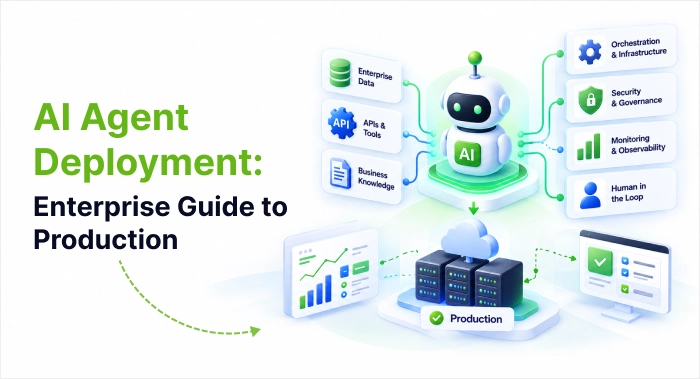
An AI agent that works well in a demo can still fall apart once real users, real data, and real budgets arrive. That gap is why so many pilots never reach production. Successful AI agent deployment depends less on the model and more on the architecture, infrastructure, security, and monitoring around it. This guide covers what deployment involves, the benefits it unlocks, which architecture to choose, what infrastructure you need, a step-by-step roadmap, and how to keep humans in control. You’ll finish with a practical checklist for taking enterprise AI agents from prototype to production.
What AI Agent Deployment Actually Involves
AI agents are software systems that pursue a goal by reasoning, picking tools, and acting on business systems. They don’t follow a fixed script. That flexibility is what makes them useful, and what makes them harder to run reliably.
AI copilot vs AI agents
The difference between AI copilot’s vs AI agents is who drives. A copilot suggests and waits for a person to act. An agent plans and carries out multi-step work, usually pausing only at defined checkpoints. That autonomy is why agents need stronger guardrails and monitoring than a copilot does.
Why prototypes stall
In development, one developer sends a few requests to an agent. In production, you face concurrency, partial failures, token costs, security reviews, and audit requirements. Put simply, AI agent deployment is the work of making an agent dependable, observable, secure, and affordable for real users. In many platforms, it is also the moment an agent moves from a draft state to a live one.
Benefits of AI Agent Deployment
The value of an agent only appears once it is live and trusted. A well-run AI agent deployment brings these benefits:
- Adaptive automation. Unlike fixed workflows, agents choose tools and next steps toward a goal, so they can handle tasks with many possible paths.
- Leverage for small teams. Delegating work across specialized agents lets a small team manage projects that once needed a much larger one.
- Reliability at scale. Good architecture and infrastructure let agents handle growing traffic and recover from failures without disrupting users.
- Cost visibility. Tracking cost per task ties token spend to business outcomes, such as cost per resolved ticket, which makes ROI easier to prove.
- Safer operations. Guardrails, audit trails, and human approval steps reduce risk in regulated or high-stakes work.
- Faster, safer improvement. Evaluation-gated releases and monitoring make it less risky to update prompts, tools, and models over time.
These benefits aren’t automatic. They depend on the architecture, infrastructure, and release practices covered in the rest of this guide.
AI agents use cases worth deploying first
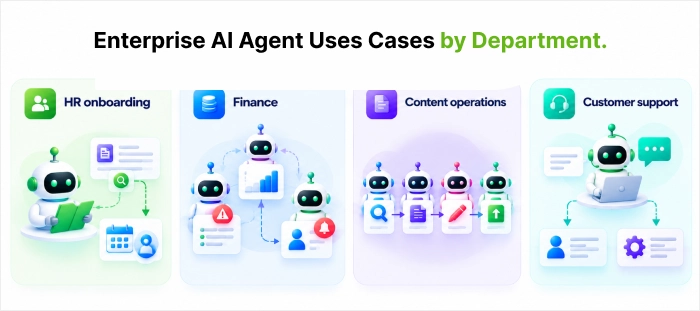 The best first project is narrow, measurable, and low risk. Common AI agent use cases include:
- HR onboarding: an assistant that searches policy documents and schedules a call with HR when an answer isn’t found.
- Finance: one agent flags risky transactions, another checks historical patterns, and a third alerts an auditor.
- Content operations: research, SEO, drafting, and publishing agents working as a pipeline.
- Customer support: a routing agent that hands inquiries to billing or technical specialists.
Pick one, define success metrics, and expand once the first agent proves stable.
Architecture Patterns for AI Agent Deployment
Your AI agent architecture is the blueprint for how the agent runs, remembers, and connects to other systems. The first decision is the execution model.
Three core execution models
- Stateless request-response. Each call is independent, like a classic API. This suits document analysis, extraction, or classification. It scales by adding instances, but all contexts must travel with every request.
- Stateful session based. The agent remembers earlier turns, as support bots and coding assistants do. You must decide where session state lives, how long it persists, and what happens if an instance crashes mid-conversation.
- Event-driven asynchronous. The user submits a task, gets an acknowledgment, and is notified when it finishes. Workers pull jobs from a queue. This handles long-running work well, at the price of more moving parts.
Most real systems mix all three. A support platform might use stateless agents for FAQs, stateful agents for live chats, and event-driven agents for deep case investigations.
Deployment topologies
How you arrange agents matters as much as how each one runs:
- Single agent: one focused capability, such as SQL generation. It is the easiest to build, test, and maintain.
- Agent pool: many identical agents behind a load balancer, scaled by queue depth or latency.
- Multi-agent systems: specialized agents (for example, a router plus billing, technical, and account specialists) coordinated by an orchestrator. They scale each specialty independently but need careful orchestration to avoid cascading failures and runaway token spend. In short, multi-agent systems trade simplicity for flexibility.
- Hierarchical systems: a supervisor breaks work into tasks, delegates to workers, checks quality, and handles retry.
How to choose
Start from your constraints, not from the trendiest pattern:
- Traffic: sporadic, low-volume traffic favours serverless stateless agents. Heavy concurrent conversations favour containers with dedicated compute.
- State: if users expect the agent to remember earlier context, you need stateful sessions.
- Complexity tolerance: every added agent multiplies operational load. Start simple and add complexity only when simpler designs fall short.
- Budget: architecture affects token cost. Long-running containers can cache embeddings, and batching in event-driven setups can cut repeated calls.
- Team skills: Kubernetes offers flexibility if you have strong DevOps. Smaller teams often do better with managed services.
The AI Agent Infrastructure Stack: Five Layers
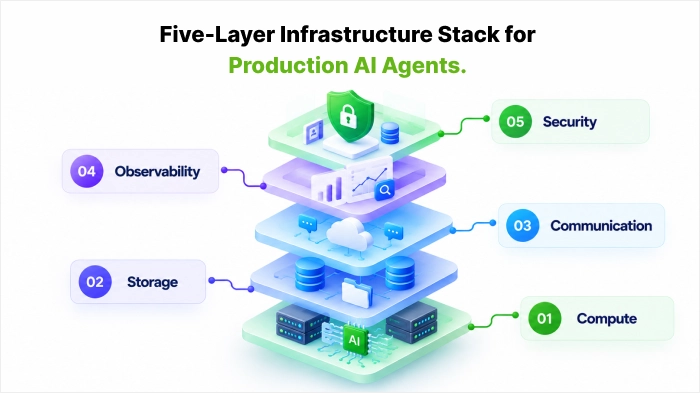
Reliable AI agent deployment rests on five infrastructure layers. Skipping one usually shows up later as an outage or a surprise bill. We will discuss them in brief here one by one.
Compute. Serverless functions such as AWS Lambda or Google Cloud Run fit stateless agents with unpredictable traffic. Containers on ECS or Kubernetes suit stateful agents. Dedicated VMs help where cold starts are unacceptable.
Storage. Short-lived session data fits a fast store like Redis. Long-term memory and semantic search fit databases and vector stores such as Pinecone or Deviate. Memory adds complexity, so persist only what you need.
Communication. REST handles synchronous calls and WebSocket’s handle streaming replies. Message queues coordinate async and multi-agent work. An API gateway manages authentication, rate limits, and routing, and each external tool integration. Credential handling and retry logic.
Observability. Structured logs, metrics, and distributed tracing show how the agent reasons and where time and tokens go. Agent-aware tools such as LangSmith or Langfuse capture details that generic monitoring misses.
Security. Store secrets in a vault, restrict network access, validate inputs against prompt injection, filter outputs for sensitive data, and keep audit trails.
From Prototype to Production: A Step-by-Step Roadmap
If you’re asking how to build AI agents that survive production, treat the build and the release as one continuous process. Every stage of AI agent deployment below builds on the last.
Build and validate
- Define the role, goal, and guardrails. State who the agent is, what business outcome it owns, and which model it uses. Set responsible-AI rules from day one.
- Connect tools and data. Agents create value when they can act on your systems, not just talk. Use prebuilt connectors for common systems and wrap custom logic (for example, an internal validation API) as reusable tools. Many platforms combine a no-code studio with an SDK so business and engineering teams can work together.
- Orchestrate and evaluate. If several agents collaborate, define how they communicate. Test on realistic, messy scenarios and review the reasoning trail, not only the final answer.
Release and operate
- Containerize. Package code, dependencies, and configuration in Docker images. Keep images lean, inject secrets at runtime, and add health checks that also verify LLM APIs and databases. Store versioned images in a registry.
- Deploy to the cloud. Use serverless for variable, stateless workloads and orchestrated containers for stateful ones. Set memory and timeouts generously enough for multi-step reasoning, since a short timeout that suits simple queries will fail on complex ones. Configure readiness and liveness probes.
- Automate with CI/CD. CI/CD for AI agents should run your evaluation suite before every release, so quality checks gate production. Use blue-green rollouts to shift traffic gradually. For risky changes, use shadow deployments, where the new version processes live traffic silently while users still see the current version’s answer. Version prompts, tool definitions, and configuration alongside code.
- Monitor continuously. Track tool-call success rates, latency, reasoning length, and user satisfaction. Add cost per task (such as cost per resolved ticket), because business owners need that number to judge ROI. Set alerts on daily token spend and use tracing to see which agent consumed what.
Security, Governance, and Human Oversight
Speed means little if the deployment can’t pass a security review.
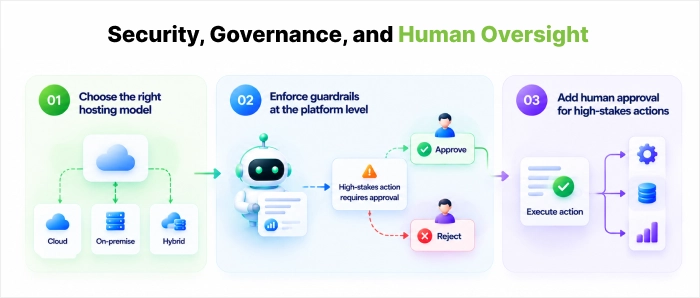
- Choose the right hosting model. Regulated industries such as finance and healthcare often need on-premises or private-cloud options so data stays in their own environment.
- Enforce guardrails at the platform level. PII redaction, output filtering, and audit logs work better built in than bolted on.
- Add human approval for high-stakes actions. Financial transactions, medical recommendations, and legal finalization should pause for explicit sign-off. That requires stateful orchestration that can hold a pending task for hours or days without losing context.

Common Challenges When Deploying AI Agents
Let us be honest: no AI agent deployment goes perfectly. The encouraging part is that the biggest hurdles are well known, so you can prepare for them instead of scrambling when they appear.
Unpredictable Agent Responses
Ask an agent the same question twice, and you might get two slightly different answers. Add an unannounced model update from your provider, and yesterday’s dependable agent can start acting like a stranger.
What helps: Pin model versions, keep instructions under version control, and turn down the randomness setting (temperature) for tasks that need consistency. When another system reads the agent’s output, insist on a fixed format such as JSON. And before you accept any model upgrade, rerun your full evals.
Security and Unauthorized Tool Access
The same access that makes an agent useful also makes it a target. A harmful instruction hidden inside an email, a PDF, or a web page can try to hijack the agent through prompt injection, nudging it to leak data or take actions it was never meant to.
What helps: Treat all outside content as untrusted. Enforce permissions in the tool layer itself, because prompts can be manipulated and code rules cannot. Run code in isolated sandboxes, log every tool call, and invite red-team testers to attack your agent before real attackers do.
Incorrect Actions and Hallucinations
When a chatbot invents a fact, it is embarrassing. When an agent invents an action, such as updating the wrong customer record or approving a refund nobody signed off, it is expensive.
What helps: Ground answers in verified company data, check every tool input before it runs, and add a confirmation step before anything that cannot be undone. When the agent is unsure, it should say so and hand over to a person rather than take a confident guess.
Cost, Performance, and Scaling Issues
An agent that felt quick and cheap with 20 testers can feel slow and costly with 20,000 users. Long prompts, repeated tool calls, and retry loops quietly multiply both waiting time and token spend.
What helps: Load-test before launch, cache repeated lookups, keep prompts lean, route simple work to smaller models, and set firm spending caps per agent. In the first few months, review cost and speed every week, not every quarter.
Conclusion
Strong AI agent deployment is about matching your agent’s needs to infrastructure your team can run reliably and affordably. The key points to take away:
- Choose the simplest architecture that meets your traffic, state, and budget needs.
- Build all five infrastructure layers, especially observability and security.
- Automate testing and releases with evaluation-gated CI/CD.
- Track cost per task so you can prove ROI and capture the benefits.
- Keep a human in the loop for high-stakes decisions.
Start small, instrument everything, and let production data guide what you add next. The agent that ships and improves beats the perfect design that never leaves the whiteboard.
Ready to plan your AI agent deployment?
Book a demo with Sphinx and we’ll help you map your first agent from prototype to production.Frequently Asked Questions
What is AI agent deployment?
It’s everything involved in getting an AI agent out of development and into a live environment where real people rely on it. That includes choosing the architecture, setting up infrastructure, securing the system, testing, releasing, and monitoring it over time.
What are the benefits of AI agent deployment?
The main benefits are adaptive automation, more leverage for small teams, reliable performance at scale, clearer cost and ROI tracking, safer operations through guardrails, and easier ongoing improvement. They only materialize when the deployment is well designed and monitored.
What’s the difference between AI agents and AI copilots?
A copilot helps you do a task, while an agent does the task for you. Copilots suggest and wait for your approval. AI agents plan several steps, use tools, and act on their own, checking in with you only at set points. Because of that, agents need tighter guardrails.
How do you deploy an AI agent to production?
In short: define the agent’s goal, connect its tools and data, test it on realistic scenarios, package it in a container, deploy it to cloud infrastructure, automate releases with CI/CD, and monitor it closely once it’s live. Each step is covered in the roadmap above.
How long does it take to deploy an AI agent?
It depends on how complex the agent is. A simple proof of concept on a managed platform can be up quickly. An agent that connects to legacy systems, meets compliance rules, and passes thorough testing takes longer. Scope, integrations, and security requirements are the biggest factors.
How much does it cost to run an AI agent in production?
Costs vary widely, but the main drivers are model usage (tokens), compute, storage, observability tools, and engineering time. Tracking cost per task, such as cost per resolved ticket, is the clearest way to see whether your agent is worth its price.
Do I need multi-agent systems, or is one agent enough?
Often one agent is enough, and it’s much easier to test and debug. Consider multi-agent systems when a single agent can’t cover the range of skills you need, or when different tasks need to scale independently.
Why do AI agents fail in production?
Common causes include missing monitoring, weak state handling, timeouts that are too short for multi-step reasoning, untested prompt or tool changes, and costs nobody tracked. Most are avoidable with good architecture, evaluation-gated releases, and observability from day one.
How do you monitor AI agents after launch?
Log each reasoning step and tool call, track success rates, latency, and token usage, and use tracing to follow requests across agents. Set alerts for cost spikes and error rates and review the reasoning trail whenever an output looks wrong.
Are AI agents safe for regulated industries like finance and healthcare?
They can be, with the right controls. Typical safeguards include private-cloud or on-premises hosting, PII redaction, audit logs, output filtering, and human approval before high-stakes actions. Always check your specific compliance requirements with your legal and security teams.
Should I use serverless or Kubernetes to deploy AI agents?
Serverless works well for stateless agents with unpredictable traffic and keeps idle costs low. Kubernetes or other container platforms suit stateful agents that need consistent environments. If your team is small, a managed service can be the easier option to operate.


 Shaili Gupta

 Ajay Wadne