01
One place for every date
An all-in-one reminder tool for iOS and Android covering birthdays, anniversaries and everyday obligations, rather than three apps that each do part of it.
Overview
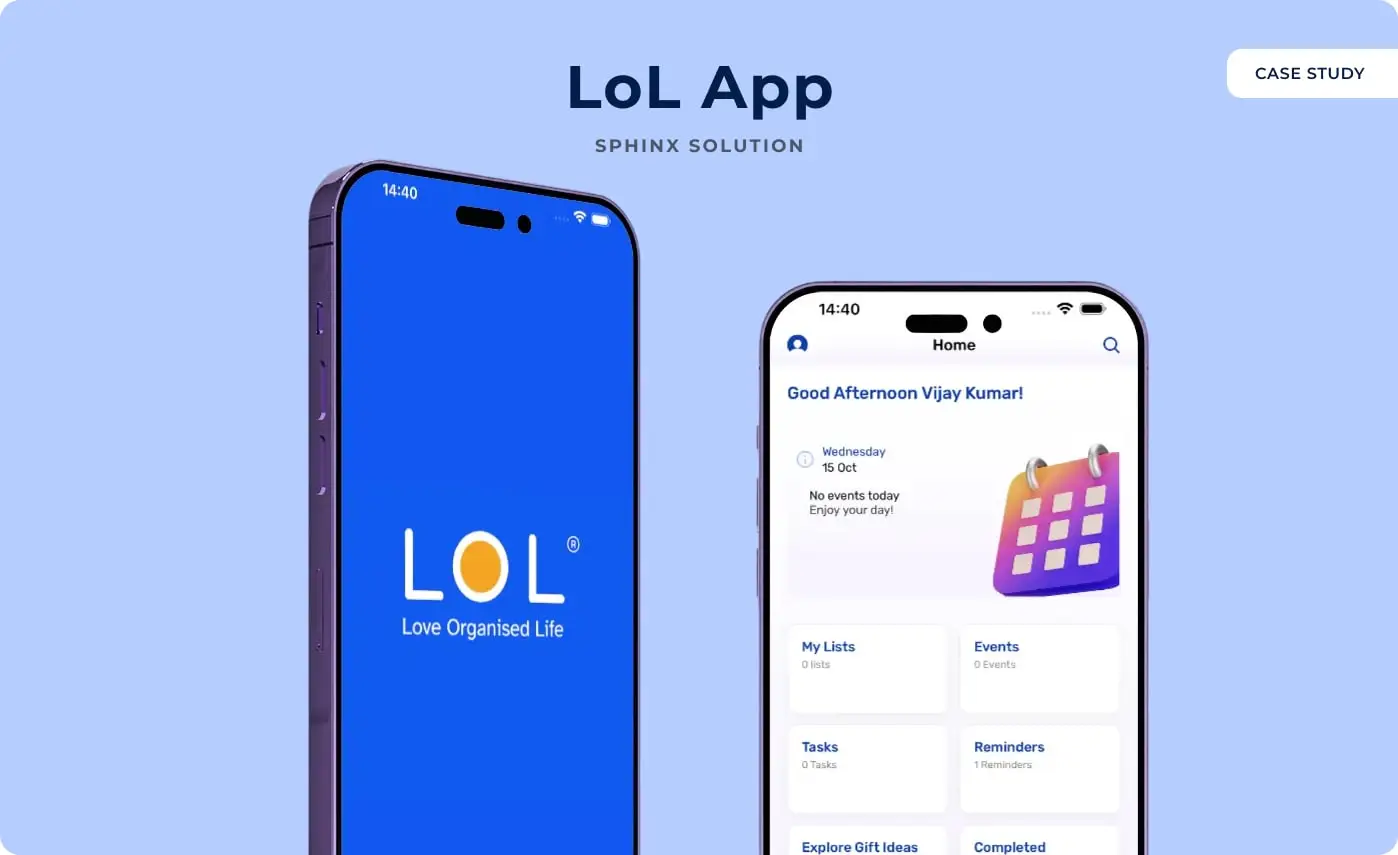
LoL stands for Love Organised Life, and it is a reminder app for the dates that matter to people rather than to their employers: birthdays, anniversaries, appointments and the everyday things that get forgotten between them.
Sphinx Solutions built it as one cross-platform app for iOS and Android, with a calendar at the centre and alarm-backed reminders behind it.
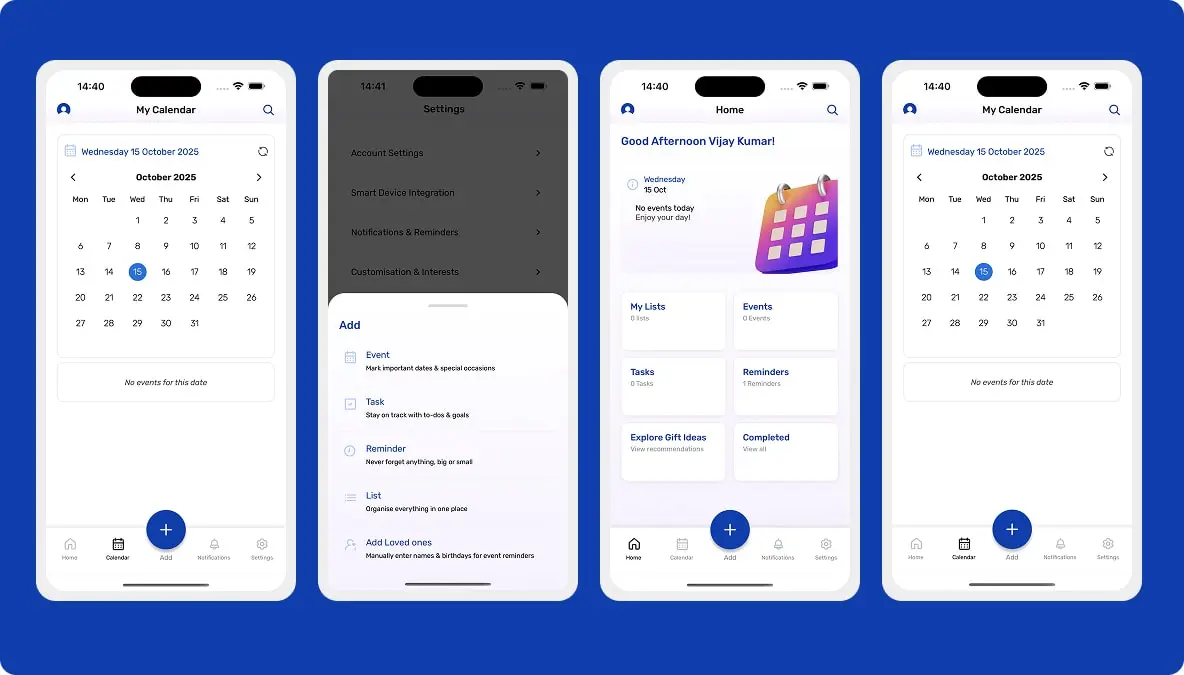
The point of it is that a personal calendar and a birthday reminder should not be two apps. LoL puts events, tasks, lists and loved ones’ birthdays in the same place, and lets somebody add any of them from one button.
Underneath, the work was in reliability rather than features: real-time alerts, storage that holds, and syncing that keeps devices in step. A reminder app that occasionally does not remind you is worse than no reminder app.
Client Requirement
01
An all-in-one reminder tool for iOS and Android covering birthdays, anniversaries and everyday obligations, rather than three apps that each do part of it.
02
Customisable notifications that actually interrupt. The difference between a notification and an alarm is the difference between remembering and having remembered.
03
Easy navigation and fast reminder setting, for users of any age. This is an app people set up once a year and rely on the other 364 days.
04
The same experience on Android and iOS, with devices staying in sync rather than each holding its own version of the truth.
05
The app holds personal events and personal data, so encrypted storage, reliable backups and secure login were requirements rather than extras.
06
An architecture that would take calendar sync, shared reminders and smart suggestions later without being rebuilt for them.
People track birthdays, events and anniversaries across several apps, which is how they end up with cluttered reminders and a missed occasion anyway. The client wanted one dependable place for all of it.
The apps already out there were the problem: plenty gave you a basic alert, but not real-time updates across devices, not much customisation, and not a design anyone enjoyed using.
The brief came down to four hard parts. Build a reminder system that stays clutter-free while holding events, occasions and daily tasks together.
Deliver notifications reliably across a range of devices and across time zones, which is where most reminder apps quietly fail.
Handle a lot of reminders and per-user settings while staying quick and keeping the data safe.
And keep the whole thing pleasant for someone who is not especially technical, because that is most of the audience for an app about remembering birthdays.
We built it in React Native so one codebase serves both platforms, with the reliability work concentrated where a reminder app lives or dies.
Fast loads and dependable updates come from the backend design and the cloud setup behind it. On this product that is not infrastructure detail, it is the feature.
Sphinx Solutions delivered LoL as a cross-platform React Native app on both stores: one calendar holding events, tasks, lists and loved ones’ birthdays, alarm-backed reminders over Firebase Cloud Messaging, gift suggestions, and encrypted storage with real-time sync behind it.
“Partnering with Sphinx Solutions to develop the LoL App was an incredible experience. The team fully understood our goal of building a reminder app that genuinely helps with time management and daily planning. Their skill in mobile application development, along with great attention to detail, resulted in a platform that was smooth, dependable, and enjoyable. We genuinely appreciate their dedication to quality and innovation.”
How We Work
Six stages, from understanding what the client meant by organised to keeping the app current after release.
Step 1
We worked through the client’s vision for an app that helps people plan activities, tasks and occasions, and what that meant in practice.
Step 2
A scalable, secure architecture for cloud sync, real-time reminders and personal data, with Node.js and MongoDB behind it.
Step 3
A clean, interactive interface built on minimalism, accessibility and consistency, so setting a reminder and reading a calendar are both effortless.
Step 4
Secure login, alarms, repeat scheduling and customisable reminders, plus the notification and syncing APIs that keep several devices aligned.
Step 5
Usability, performance and compatibility tested across both platforms, checking for latency and data loss rather than just for crashes.
Step 6
Released on the App Store and Play Store, with maintenance, performance work and version updates continuing afterwards.
Implementation
The four pieces the build came down to.
People wanted one calendar-shaped tool that held birthdays, occasions and everyday activities together, in an interface they did not have to learn.
A backend carrying notifications, recurring alerts and customised reminders, working the same way on iOS and Android.
An interface where schedules, activities and reminders are managed in a few taps, which is the whole promise of the product.
Accuracy, security and speed tested before release, because a reminder that arrives late has already failed.
Impact
Daily schedules, birthdays and events organised together, which removes the reason people were running three apps in the first place.
Smart alerts with alarms behind them, so the notification lands when it is useful rather than after the event.
A consistent experience on iOS and Android from one codebase, with devices staying in step.
Turning reminders into something quick and pleasant changes how often people actually use them, which is the only measure that matters here.
Tech stack
In closing
LoL started as a simple idea: one app for the dates people care about. We built it into a calendar that holds events, tasks, lists and the birthdays of the people in your life, with reminders and alarms that can be trusted to go off.
It runs from a single React Native codebase on both stores, over a Node.js and MongoDB backend with Firebase handling the alerts. The design work went into making something an infrequent user can pick up a year later and still find obvious.
What people usually ask about LoL App and about building something like it.
LoL stands for Love Organised Life. It is a reminder and planning app that keeps birthdays, events, tasks and lists in one calendar, with alarm-backed reminders so the important ones are hard to miss.
Yes. It is built from one React Native codebase and published on both the App Store and Google Play, so the experience and the data are the same wherever you open it.
The whole thing: UI/UX design, the backend, the notification and syncing infrastructure, and the feature set on top. It was released on both stores and is maintained since.
React Native with Redux on the front, Node.js and Express behind it, MongoDB with Realm and Firebase for data and alerts, running on AWS. That combination is what gives it cross-platform parity and notifications that arrive on time.
It is mostly a scheduling and delivery problem rather than an app problem. The alert has to be computed against the right zone, queued somewhere that does not depend on the phone being awake, and delivered through a push service built for it. That is why the notification path is where most of the engineering in a reminder app ends up.
Connect with us


