01
Screen-time lock
An easy-to-access digital wellbeing app that lets users lock their device for specific time windows, to manage screen time and deal with distractions.
Overview
Sphinx Solutions partnered with Locks4Phone, a digital wellbeing app for Android users that helps manage and control phone usage through scheduled lockouts.
The result is lightweight, effective, user-friendly software on the Google Play Store that gives people the tools to focus, reduce screen time and build better digital habits.
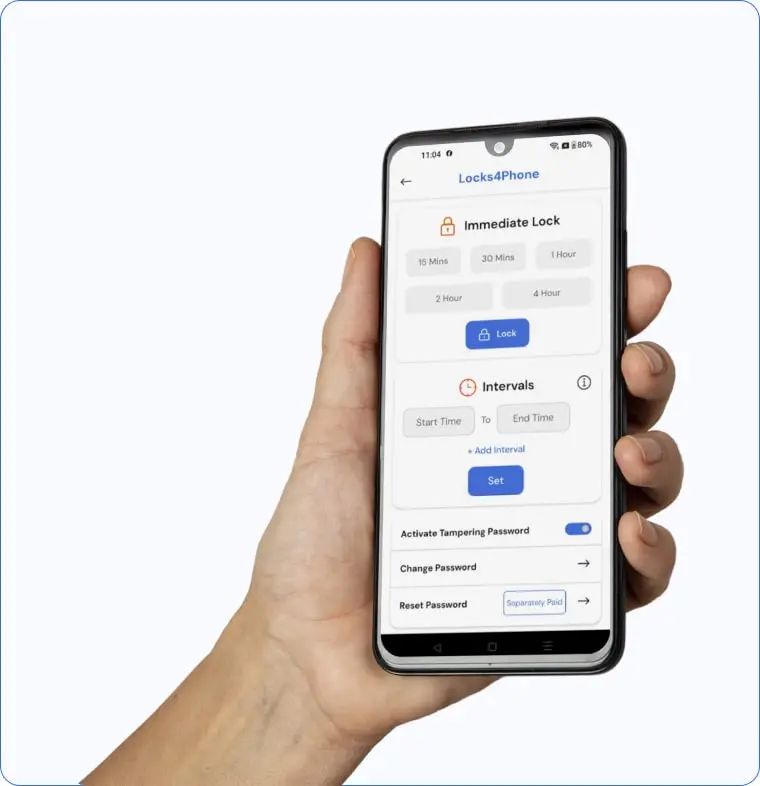
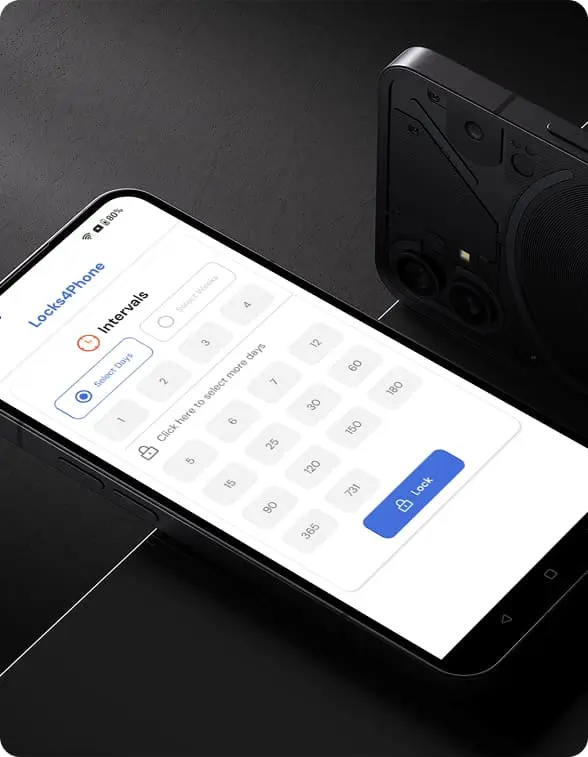
The app lets users set lock durations, reset passwords and prevent system tampering, for uninterrupted focus. With ad management, free and premium subscription choices, and a secure admin panel for managing users, subscriptions and reports, our team made the idea a reality.
The aim was a straightforward, dependable and easy-to-use experience for administrators and users alike.
Client Requirement
01
An easy-to-access digital wellbeing app that lets users lock their device for specific time windows, to manage screen time and deal with distractions.
02
Locks that hold through reinstallation, time changes and permission removal while a lockdown is scheduled, with password protection against tampering.
03
Free and paid versions, the paid plan adding an ad-free experience, multiple lock durations and usage tracking.
04
Ad management in the free version, and in-app purchases for services like password resets, improving both the user experience and monetisation.
05
Manage users, subscriptions, password reset requests and advertisements, and generate usage reports for operational control.
06
An intuitive, clean, lightweight application with smooth performance, minimal battery use and compatibility across a wide range of Android devices.
The smartphone has made us hyperconnected, and overreliance on these devices now shows up as low productivity, constant distraction and many mental health problems.
Locks4Phone was created to fill this gap: a digital wellbeing app that helps users stay focused, reduce distractions and build better phone habits on any Android device.
Although there are many digital wellbeing tools, none offered a simple, effective and safe way for users to lock their phones voluntarily for a set time, without the risk of the lock being exploited or easily hacked.
The client identified the need for a dedicated Android application that helps users manage their screen time, with reliable security controls, flexible lock schedules and an intuitive experience.
They also needed an all-inclusive admin panel to manage subscriptions, monitor user behaviour and ad layouts, and control the platform.
Building it meant solving four problems. The lock could not be bypassed by changing system settings, uninstalling the app or force-stopping it mid-session. The interface had to work for people of all ages, including those not used to wellbeing tools. Subscriptions, in-app purchases and ads could not slow the app down. And performance had to hold across Android devices with very different OS versions, hardware and security restrictions.
Our goal was a lightweight, secure, easy-to-use Android app that helps users manage their screen time effectively, running smoothly in the background with minimal battery and memory use.
We saw Locks4Phone as more than just a screen-locking app; it was an opportunity to help people build healthier phone habits and reclaim their focus in a world of constant digital distractions. Our team concentrated on developing a straightforward, safe and reliable tool that helps users manage their screen usage, fusing simple design, clever security features and a considerate user experience.
“The Locks4Phone app has been a game-changer for our digital wellbeing initiative. Its simple setup, secure locking features and reliable performance made it easy for users to manage screen time and focus better. The clean design and thoughtful features like tamper prevention and scheduled lockouts set it apart. Thanks to the Sphinx Solutions team for understanding our vision and delivering an app that met every expectation.”
How We Work
Step 1
We began by understanding the client’s vision, target audience and core requirements, outlining the key features, security needs and backend functions for the app and the admin panel.
Step 2
Clean, intuitive layouts focused on smooth navigation and quick access to the essential features, simple enough for all age groups while staying modern and visually appealing.
Step 3
A secure backend for user data, subscriptions, password reset requests, ad management and usage reports, with a web-based admin panel for real-time management of users and app content.
Step 4
A native Android application with scheduled lockouts, password protection, tamper prevention and subscription management, optimised for minimal battery and memory use.
Step 5
Rigorous testing on multiple Android devices and OS versions, with special attention to the security functions and to preventing bypass attempts during lock sessions.
Step 6
After testing and client approval, Locks4Phone was deployed on the Google Play Store, with post-launch support and updates to address user feedback and enhance features.
Implementation
Detailed discussions with the Locks4Phone team about their goals, users’ problems and ideal features set a precise plan and schedule for the admin panel and the app.
We mapped the whole experience, from downloading the app and setting lock durations to managing subscriptions and requesting password resets, so every interaction was covered.
Interactive prototypes and simple layouts for the client to evaluate, refined quickly with their input before full-scale development.
A native Android application with scheduled lockouts, password protection, subscription management and ad integration, with special care for performance and battery use.
A secure backend and a web-based admin panel for users, subscriptions, password resets, advertisements and reports, so the client’s operations team can run the platform smoothly.
Compatibility, stability and security examined across Android devices and OS versions, then released on the Google Play Store, with our team continuing to support upgrades.
Impact
Scheduled lockouts and screen restrictions in a few taps reduced distractions and helped users stay focused during work, study or family time.
Secure lock features and tamper-prevention controls gave users confidence that a lock session could not be bypassed.
Several subscription levels and a clear, ad-free paid edition, while staying lightweight for free and premium users alike.
Anyone, whatever their age, can set lock periods, manage subscriptions and request password resets.
In closing
Locks4Phone partnered with Sphinx Solutions to create a secure, lightweight, easy-to-use Android app for digital wellbeing and phone usage management. We developed a performance-optimised app with advanced lock features, flexible subscriptions and a user-friendly admin panel.
The project improved user focus, reduced digital distractions and gave people of all ages a reliable way to lock their phones. With its clean interface, tamper-proof controls and smooth performance, Locks4Phone now offers a trusted, hassle-free way to control screen time.
What people usually ask about Locks4Phone and about building something like it.
Locks4Phone is a mobile app that helps you manage screen time and reduce phone distractions by locking your phone for a set duration. Once the lock is on, you can’t open your apps, settings or notifications until the timer runs out, which helps you stay focused and present.
No. For security and digital wellbeing reasons, once you start a lock session it cannot be bypassed, force-stopped or uninstalled until the timer finishes. That guarantees the phone-free time you planned.
You can set scheduled lock sessions and protect access with a secure password. It also offers break-in alerts, and the admin panel handles password reset requests.
Yes. The app is optimised for smooth performance across a wide range of Android devices and OS versions, and has been rigorously tested for consistent, reliable operation.
Yes. Locks4Phone offers free and premium plans. The paid version removes ads and unlocks additional features.
Connect with us