In the rapidly evolving landscape of 2026, the cloud is no longer just a storage space, it’s the engine driving global AI transformation. Whether you are deploying an Agentic AI model or managing complex microservices, the gcloud CLI (Command Line Interface) is your primary cockpit for Google Cloud Platform (GCP).
Recent industry data suggests that over 85% of enterprise developers now prefer CLI-based workflows over traditional GUIs for their speed and scriptability. If you’re ready to streamline your cloud operations and integrate modern tools like Gemini and Claude Code, mastering the gcloud CLI install is your first step.
In this guide, we will walk you through:
- A clear definition of what an SDK is and why it matters.
- Step-by-step instructions to install gcloud CLI on macOS, Windows, and Ubuntu.
- Initialization and authentication best practices.
- How Sphinx Solutions can accelerate your digital transformation.
Table of Contents
- What is an SDK? Understanding the Foundation
- Why You Need the gcloud CLI in 2026
- How to Install gcloud CLI on macOS (install gcloud cli mac)
- How to Install gcloud CLI on Windows
- How to Install gcloud CLI on Ubuntu/Linux (install gcloud cli ubuntu)
- Initializing and Testing Your Installation
- The Future of Cloud: Gemini and Claude Code Integration
- 2026 Use Cases & Trends
- User Reviews & Sentiment
- Frequently Asked Questions (FAQ)
What is an SDK? Understanding the Foundation
Before we dive into the terminal, let’s answer a question that frequently pops up for new developers: What is an SDK?
An SDK, or Software Development Kit, is a collection of software development tools in one installable package. Think of it as a pre-packaged toolkit that contains everything a builder needs to create a specific piece of furniture. Instead of hunting for individual screws and saws, the SDK provides the libraries, documentation, code samples, and APIs required to build applications for a specific platform.
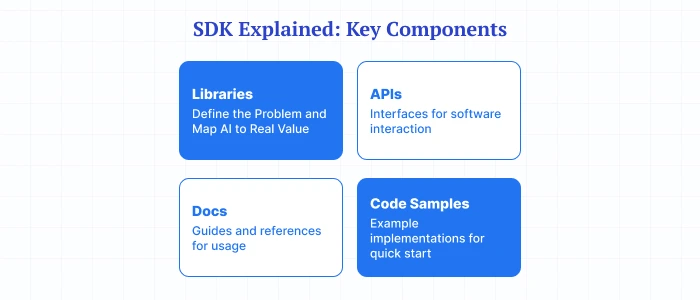
The Google Cloud SDK is the overarching package that includes the gcloud CLI, along with other essential tools like gsutil (for Cloud Storage) and bq (for BigQuery). By performing a gcloud cli install, you are essentially setting up the primary interface of this SDK to communicate with Google Cloud’s vast infrastructure.
Why You Need the gcloud CLI in 2026
In 2026, the cloud environment is more intelligent than ever. With the rise of AI development services, developers are increasingly using terminal-based assistants like Claude Code and Gemini to automate infrastructure management. If you are planning a gcloud cli install, getting comfortable with the basics now will save you time later.
Having the gcloud CLI locally installed allows you to:
- Automate Deployments: Script your CI/CD pipelines with precision.
- Enhanced Security: Manage IAM roles and service accounts without clicking through dozens of console pages.
- AI Synergy: Use AI coding assistants to generate gcloud commands that execute directly in your environment.
Pro Tip: Are you looking to scale your infrastructure? Our team of dedicated DevOps developers can help you optimize your GCP environment for maximum ROI.
How to Install gcloud CLI on macOS (install gcloud cli mac)
Whether you’re on the latest M4 Apple Silicon or an older Intel-based Mac, the installation process is smooth. If you have been searching for install gcloud cli mac, this is the section you need.
Method 1: The Interactive Installer (Recommended)
This is the most reliable way to install gcloud CLI mac versions.
- Open your Terminal (Command + Space, type “Terminal”).
- Run the installation script:
- Follow the prompts: The script will ask where to install the files and if you want to update your PATH.
- Restart your shell:
Method 2: Using Homebrew
If you prefer package managers, you can use Homebrew:
Note: For Apple Silicon users, ensure you have the ARM64 version of Homebrew installed to avoid Rosetta 2 translation overhead.
How to Install gcloud CLI on Windows
Windows development has reached new heights in 2026 with full PowerShell and WSL2 support.
Step 1: Download the Installer
To install gcloud cli windows, download the Google Cloud SDK interactive installer from the official portal. Alternatively, use PowerShell to fetch it directly:
Step 2: Run the Setup
- Launch the .exe file.
- Ensure “Cloud Tools for PowerShell” is checked during the selection process.
- Complete the wizard and let it handle the environment variables for you.
How to Install gcloud CLI on Ubuntu/Linux (install gcloud cli ubuntu)
For the backend wizards, here is the standard method to install gcloud cli ubuntu using the apt package manager. If your goal is a clean gcloud cli install on Linux, Ubuntu is usually the fastest place to start.
- Update your package list and install dependencies:
- Import the Google Cloud public key:
- Add the gcloud CLI repo to your system:
- Install the CLI:
Initializing and Testing Your Installation
Once the installation is complete, you need to link your local CLI to your Google account. Run the following command in your terminal:
What happens during initialization?
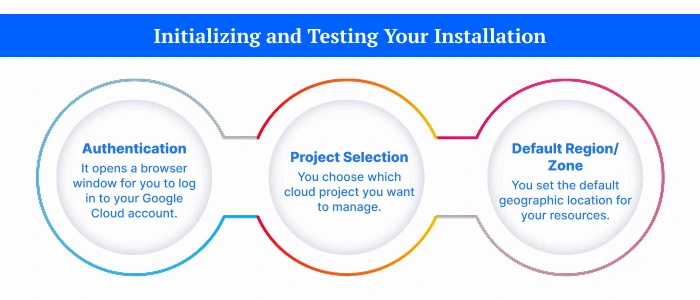
- Authentication: It opens a browser window for you to log in to your Google Cloud account.
- Project Selection: You choose which cloud project you want to manage.
- Default Region/Zone: You set the default geographic location for your resources.
To verify your installation, type:
If you see a list of components (like core, bq, and gsutil), congratulations! You have successfully mastered the gcloud cli install.
The Future of Cloud: Gemini and Claude Code Integration
As we look ahead through 2026, the gcloud CLI is becoming the backbone for AI-driven development. Tools like Claude Code (the terminal-based agent) can now read your local gcloud configuration to help you write smarter deployment scripts.
Similarly, Gemini Code Assist integrates directly with your terminal environment to provide real-time suggestions for complex gcloud compute or gcloud container commands. This “Agentic Workflow” is significantly reducing the time-to-market for modern startups, a core mission at Sphinx Solutions.
2026 Use Cases & Trends
So what does this look like in the real world? In 2026, the gcloud CLI is no longer just a setup utility. It is turning into a practical execution layer for AI-assisted operations, DevSecOps, and cloud orchestration.
Top 2026 Use Cases You Should Watch
- Agentic AI Workflows
- Teams are increasingly using the gcloud CLI as a handoff point for autonomous agents that need to manage both Google Workspace and Google Cloud resources.
- In practice, that means an AI agent can trigger workflows that touch Gmail, Drive, service accounts, IAM policies, storage buckets, and compute resources from one command-driven environment.
- If your organization wants less manual switching and more controlled automation, this is a big deal.
- High-Speed Data Transfers
- The newer gcloud storage module has been highlighted as being up to 94% faster than traditional tools like gsutil for some transfer scenarios.
- That matters when you are moving training datasets, backups, media files, or analytics exports at scale.
- Translation? Less waiting around, fewer pipeline bottlenecks, and faster release cycles.
- Automated Security Scanning
- Developers are beginning to use Gemini CLI extensions for in-repo security analysis before deployment.
- This helps flag risky configurations, suspicious code paths, and deployment issues earlier in the SDLC (Software Development Life Cycle).
- It is basically a smarter pre-flight checklist before your code goes live.
- SRE & Incident Response
- Site Reliability Engineers (SREs) are using CLI-based AI tools to diagnose outages in real time.
- Instead of bouncing between dashboards, logs, and tickets, they can query infrastructure, inspect configs, and generate action steps directly from the terminal.
- When every minute of downtime costs money, that speed matters.
Quick Reality Check: If your teams are still juggling disconnected scripts, cloud consoles, and security tools, you are already feeling the pain these workflows are designed to fix.
Industry Trends Shaping the gcloud CLI Ecosystem
What is driving all this momentum? A few clear shifts are shaping how companies use cloud command surfaces in 2026:
- Outcome-First digital transformation: Businesses care less about adopting tools for the sake of it and more about measurable outcomes like faster deployments, lower incident resolution time, and better governance.
- Unified command surfaces replacing fragmented tools: There is a visible move toward consolidating workflows that used to live across gsutil, bq, and gcloud into more unified command experiences.
- Deep security integration: Security is moving closer to the development workflow, especially with the market attention around Google’s deeper security strategy and its Wiz acquisition, which signals tighter alignment between cloud operations, posture management, and pre-deployment risk visibility.
Why This Trend Matters for You
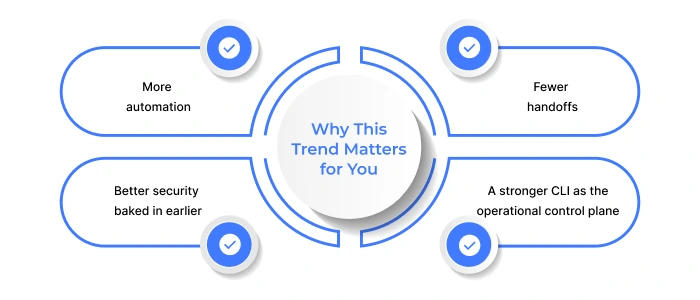
If you are building modern cloud workflows, the pattern is pretty clear:
- More automation
- Fewer handoffs
- Better security baked in earlier
- A stronger CLI as the operational control plane
At Sphinx Solutions, we help businesses implement these advanced workflows without turning their stack into a science experiment. From AI app development to cloud automation and secure digital transformation, our team can help you operationalize the right mix of agentic AI, automation, and governance.
User Reviews & Sentiment
If you are wondering whether the broader market is actually buying into this shift, the sentiment is largely positive.
What the Review Signals Look Like
- 8.9/10 composite sentiment score
- 90% likelihood to recommend
- Strong Emotional Footprint around innovation and productivity
That last point is worth pausing on. A high Emotional Footprint usually means users are not just satisfied on paper, they genuinely feel the tool helps them move faster, work smarter, and reduce friction in day-to-day operations.
What Users Generally Like
- The CLI-first workflow feels faster than jumping between multiple dashboards.
- AI-assisted command generation helps reduce repetitive manual work.
- Better consolidation means fewer tools to manage for storage, analytics, and infrastructure.
- Teams appreciate the productivity gains when automation is combined with strong cloud-native controls.
Balanced View: What Challenges Still Exist?
Of course, it is not all perfect.
- New users can still face a learning curve if they are more comfortable with GUIs.
- Migration from older scripts and legacy command habits may require cleanup.
- Advanced AI-assisted workflows need proper guardrails, especially in security-sensitive environments.
That is exactly where a partner like Sphinx Solutions becomes valuable. We help you move beyond experimentation and turn these promising tools into reliable, secure, production-ready workflows.
Maximize Your ROI with Sphinx Solutions
Setting up your local environment is just the beginning. Navigating the complexities of cloud migration, digital transformation, and AI integration requires a partner with deep expertise.
At Sphinx Solutions, we bring over 15 years of experience and a 99% client retention rate to the table. Whether you need an AI-powered chatbot or a full-scale IoT management platform, we ensure your tech stack is robust, secure, and future-proof.
Frequently Asked Questions (FAQ)
Q: Is the Google Cloud SDK the same as the gcloud CLI?
A: Not exactly. The gcloud CLI is the command-line tool inside the Google Cloud SDK. The SDK also contains other tools like gsutil and bq.
Q: Do I need to reinstall gcloud CLI for different projects?
A: No. You can manage multiple projects using one installation by using gcloud config configurations create [NAME] to switch between them easily.
Q: Can I use gcloud CLI with Gemini?
A: Yes! In 2026, Gemini is deeply integrated. You can use Gemini to help write and debug gcloud commands, and even manage AI models hosted on Vertex AI directly via the CLI.
Q: What if I have an older version of the CLI?
A: Simply run gcloud components update to ensure you have the latest features and security patches for 2026.
Installation FAQ
Q: How to install gcloud cli?
A: The quickest way is to download the Google Cloud CLI installer for your operating system, run it, and then use gcloud init to connect your account and project.
Q: How to install gcloud cli on mac?
A: On macOS, you can use the interactive installer with curl https://sdk.cloud.google.com | bash or install it through Homebrew with brew install –cask google-cloud-sdk.
Q: How to install gcloud cli in windows?
A: In Windows, download and run the official Google Cloud SDK .exe installer, or use the PowerShell command shared earlier in this guide for a faster setup.
Q: How to install gcloud cli on windows?
A: The process is the same as above: launch the official installer, enable PowerShell tools during setup, and finish with gcloud init to configure your environment.
Q: How to install gcloud cli on linux?
A: On Linux, especially Ubuntu, add the Google Cloud package repository, update your package list, and install it using sudo apt-get install google-cloud-cli.
Ready to transform your business with intelligent cloud solutions?
Contact our experts at Sphinx Solutions today to see how we can accelerate your digital journey.


 Shaili Gupta

 Ajay Wadne