Key Takeaways
- AI agent architecture is more than an LLM: Enterprise agents use reasoning, memory, tools, data, orchestration, security, and observability.
- Knowing the scope of an AI agent application and use case will help you choose the best architecture.
- Enterprise workflows require controlled autonomy: Permissions, human approvals, validation, and governance are used to make sure the agents operate safely and reliably.
- Memory, tools, and enterprise data drive agent effectiveness: Connecting agents to trusted knowledge and business systems enables them to move beyond simple conversations.
- Production-ready agents need continuous monitoring: Observability, evaluation, security, cost tracking, and failure handling are essential for scaling AI agents across an enterprise.
Connecting an LLM to a chatbot interface and calling it an AI agent is how most failed enterprise agent projects start. It works in a demo. It falls apart the first time the agent needs to check real account data, call an internal API, or make a decision that actually matters. AI agent architecture is what separates a working prototype from a system that can be trusted with production workflows.
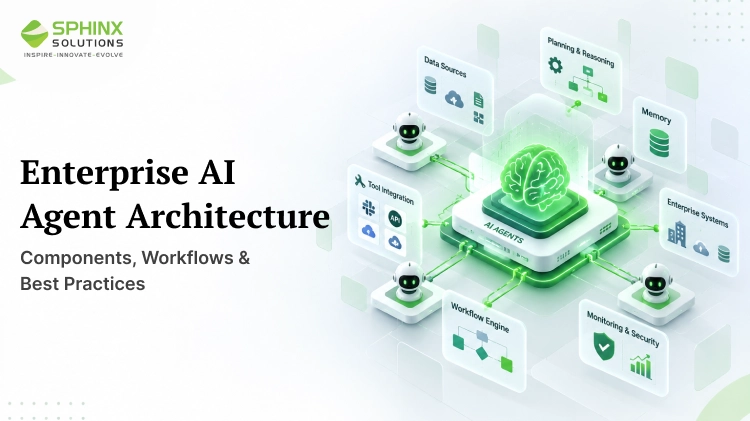
An enterprise AI agent is not just a model. It’s a system made up of interconnected components: reasoning, planning, memory, tool access, data grounding, orchestration, security, and observability, all working together. Get the architecture right, and the model becomes one component among several. Skip it, and the model is carrying weight it was never designed to carry alone.
What is AI Agent Architecture?
Architecting an AI agent is the way an agent’s reasoning model is coupled with the context, tools, and controls it requires to work reliably toward a goal rather than produce just a single answer. On the other hand, it also specifies how an agent receives a goal, reasons and plans, assesses context, chooses tools, acts, assesses outcomes, updates its context, and either continues or terminates its work.
That’s a different question from what an AI agent is conceptually. It’s a question of how the pieces are actually built and wired together in a system that has to run in production, get monitored, and be trusted with real enterprise data and actions.
Enterprise AI Agent Architecture: High-Level Overview
A practical reference model for how the layers stack:
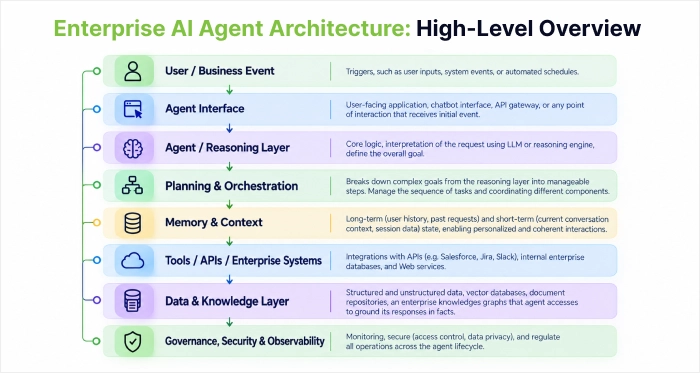
Each layer depends on the one below it. The reasoning layer is only as good as the context memory feeds it. Planning only works if orchestration can actually route tasks to the right tools. And none of it is safe to run in production without governance and observability wrapped around the whole system, not just the model at the centre.
What are the core components of AI Agent Architecture?
Agent/reasoning layer:
The LLM interprets the task, decomposes goals, and makes decisions. This is only part of the system, not the entire agent, regardless of how competent the model is on its own.
Planning and orchestration layer:
Handles task decomposition, workflow sequencing, retries, routing between tools or sub-agents, and state management across a multi-step task. This layer matters most in enterprise environments where a single request often triggers several dependent actions.
Memory and context layer:
Covers short-term task state, longer-term memory across sessions, and retrieval from vector databases where relevant. Memory design directly affects reliability, cost, privacy, and latency, since every piece of context carried forward is also a piece of context the model has to process, and a business has to secure.
Tool and integration layer:
How the agent connects to APIs, CRMs, ERPs, internal applications, and SaaS platforms, typically through function or tool calling with explicitly scoped permissions. This is where controlled access actually gets enforced, not just described in a policy document.
Knowledge and data layer:
Information from enterprise data, corporate knowledge bases, retrieval-augmented generation (RAG), structured data stores, and live data feeds. It is the grounding of the agent in enterprise data that stops it from being confidently wrong.
Communication layer:
How the agent exchanges information with users, applications, other agents, and enterprise systems. When a workflow involves several specialised agents coordinating on the same task, this layer becomes the backbone of the system, a topic covered in more depth in our guide to multi-agent systems.
Security and governance layer:
Authentication, authorisation and role-based access; data privacy controls; secrets management; audit logs; policy enforcement. Agentic systems require more robust controls than traditional chat applications as they can take actions, not just generate text.
Observability and monitoring:
Logs, traces, tool call records, latency, token usage, failure rates, hallucination tracking, and task success rate. Without this layer, a production agent is essentially a black box, and troubleshooting becomes guesswork.
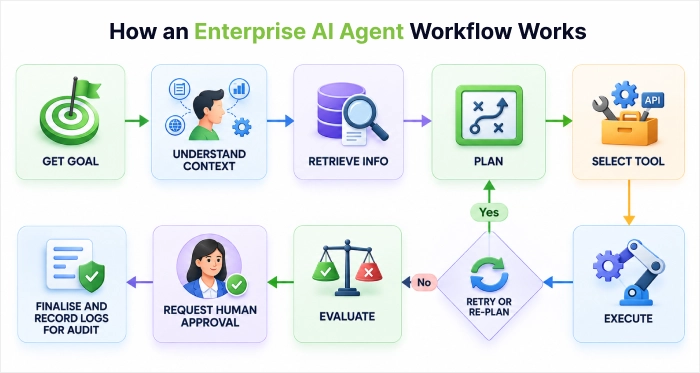
How an Enterprise AI Agent Workflow Works
The production-grade AI agent workflow looks like this:
What are the Common AI Agent Architecture Patterns?
| Pattern | How it works | Best fit |
| Single-agent | One agent manages the full workflow, tools and all | Contained, moderately complex tasks |
| Planner-executor | One component plans the steps, another executes them | Multi-step tasks where planning and execution benefit from separation |
| Router-based | A routing layer sends requests to specialized agents or tools | High-volume, varied request types |
| Multi-agent | Several specialized agents collaborate on distinct parts of a task | Workflows spanning genuinely different domains |
| Human-in-the-loop | Human approval is required before high-risk or sensitive actions | Workflows where mistakes carry real cost |
| Event-driven | Agents respond to enterprise events rather than only direct requests | Monitoring, alerting, and automated remediation workflows |
Most enterprise deployments start with a single-agent or planner-executor pattern and only move to multi-agent architecture once a workflow genuinely spans distinct specialities, a distinction covered in detail in our multi-agent systems guide.
AI Agent Architecture vs Traditional Application Architecture
| Area | Traditional application | AI agent architecture |
| Decision logic | Mostly predefined | Model-assisted, more dynamic |
| Workflow | Explicit, fixed paths | Can adapt based on context |
| Data access | Programmed integrations | Tool and function-based access |
| State | Application state | Context, memory, and task state combined |
| Errors | Code exceptions | Tool failures, model errors, reasoning mistakes |
| Testing | Mostly deterministic | Requires ongoing evaluation |
| Observability | Application logs | Logs, traces, and model or tool behaviour |
| Governance | Access controls | Access, model, and action governance combined |
Enterprise agents generally sit on top of and interact with existing enterprise architecture rather than replacing it. The database, the CRM, the ERP – none of that goes away. The agent becomes a new consumer of those systems, with its own layer of controls wrapped around it.
What are the Best Practices for Enterprise AI Agent Architecture?
- Begin with a well-scoped business result before you select any architecture, as the pattern should never drive the problem.
- Keep agent permissions tight, and agents should only have access to tools and data relevant to a particular task; having loose access is the quickest route to having a helpful agent go bad.
- Use deterministic logic wherever it’s sufficient and reserve model reasoning for the parts of the task that genuinely need it.
- Separate planning from execution when a workflow has enough steps that debugging a combined process becomes difficult.
- Design memory intentionally rather than defaulting to “remember everything,” since every piece of retained context is also a cost and a privacy consideration.
- Ground actions in trusted enterprise data instead of relying on model knowledge alone.
- Make human approval a part of every process when the cost of a mistake is high or difficult to undo.
- An experiment or case study can be misleading. Build observability into your processes from the start instead of bringing it in after an attack.
- Design explicitly for failure and recovery, since tool calls and API dependencies will fail eventually.
- Test agents with real-world tasks, not just prompt-hard case studies.
- Keep an eye on cost and latency at all times, not only during the launch cycle.
- Version prompts, tools and agent configs are the same as with any other production code.
- Steer clear of multi-agent complexity, unless the workflow truly needs the need for specialisation.
What are the Common Architecture Mistakes?
The recurring failure pattern is noticed across most troubled agent deployments:
- Treating the LLM as the entire agent instead of one component in a larger system, granting agents broader permissions than the task requires, reaching for multi-agent architecture when a single well-scoped agent would have worked, and skipping failure handling entirely, so the first API timeout takes down the whole workflow.
- Poor memory design shows up as agents that either forget critical context or carry far more of it than they need.
- Missing human approval on sensitive actions, no observability, and relying entirely on prompt instructions for security are three separate ways teams discover, usually the hard way, that a prompt is not a permission boundary.
- Connecting too many tools without a clear reason, ignoring latency and cost until they become a problem, and deploying without defined evaluation criteria round out the list.
None of these is exotic failures. They’re the predictable result of skipping architecture in favour of moving fast.
How to Choose the Right AI Agent Architecture?
Match the pattern to the actual shape of the workflow:
- Simple, predictable workflow → single agent with tools
- Complex sequential workflow → planner-executor
- Multiple specialised domains → multi-agent
- High-risk workflow → agent with human-in-the-loop
- Event-driven enterprise process → event-driven agent
Task complexity, the quantity of tools involved, the variety of sources, variability of workflow, level of risk, degree of independence, latency requirements, and compliance concerns all tend to favour one design or the other. The design is also not necessarily fixed. Many enterprise deployments begin with a single agent and graduate to a planner-executor or multi-agent arrangement as the actual complexity of the workflow becomes evident in practice.
Conclusion
Treat your enterprise AI agent as production software, not an LLM front end with a better name. What actually scales is a system architecture that integrates reasoning, data, tools, orchestration, memory, security, and observability, each doing its own thing, with governance as the architecture rather than an add-on.
Sphinx Solutions works with enterprise teams on exactly this: identifying which workflows are genuinely ready for an agent, designing the architecture around the actual risk and complexity involved, and integrating it with the systems that are already running the business. If you’re past the “what is an AI agent” stage and into the “how do we actually build this safely” stage, that’s the conversation worth having next.
FAQ’s:
What is AI agent architecture?
AI agent architecture is the structure connecting a reasoning model to the memory, tools, data, and controls it needs to pursue a goal reliably across multiple steps, rather than just generate a single response.
What are the main components of an AI agent architecture?
The core components are the reasoning layer, planning and orchestration, memory and context, tool and integration access, a knowledge or data layer, communication, and security, governance, and observability wrapped around all of it.
How does an enterprise AI agent work?
It receives a goal, gathers relevant context, plans a sequence of steps, selects and calls the appropriate tools, executes actions, evaluates the results, and either continues, retries, or escalates to a human depending on what it finds.
What’s the difference between AI agent architecture and traditional software architecture?
Traditional applications follow mostly predefined logic and fixed workflows, while AI agent architecture adds model-assisted decision-making, adaptive workflows, and governance that has to account for reasoning and tool-use failures, not just code exceptions.
What architecture is best for enterprise AI agents?
There’s no universal answer; the right pattern depends on task complexity, number of tools, risk level, and required autonomy. Simple workflows suit a single agent, while complex or high-risk ones often need planner-executor, multi-agent, or human-in-the-loop designs.
How do AI agents use enterprise APIs and tools?
Agents access enterprise systems through function or tool calling, where each tool is explicitly defined and scoped, so the agent can only take actions it’s been specifically granted permission to take.
How do you secure an enterprise AI agent?
Through layered controls: authentication and least-privilege authorisation, scoped tool permissions, audit logging, human approval for high-risk actions, output validation, and ongoing monitoring, treated as core architecture rather than an afterthought.
When should an enterprise use a multi-agent architecture?
When a workflow genuinely spans distinct specialised domains that benefit from separate agents working in parallel, not simply because a multi-agent system sounds more sophisticated than a single well-scoped agent.


 Shaili Gupta

 Ajay Wadne