Key Takeaways
- Legacy software modernization is the transformation of old systems serving today’s business, with latest technologies with better outcomes for them.
- Rising maintenance bills, unpatched security gaps and painful integrations are the first warning signs.
- Each application needs its own decision. Gartner’s seven options, from encapsulate to replace, give you a structured way to choose.
- Small, phased releases with careful data handling carry less risk than one large cutover. Surveyed CIOs increasingly favour this incremental route.
- Cost depends on code size, data volume, integrations and the strategy chosen, so an assessment should always come before a quote.
Several enterprises still depending upon the same decade old software. No one thinks about replacing it, as it is still running. Year after year, it becomes tough to work with it, to get the support and equally risky to connect with anything built till now. Legacy software modernization gives organizations a way out from old working without putting daily operations at risk.
Some leadership teams are confused about this kind of modernization and how to go for it. The complex questions are how and where to begin, which method fits each system, and how to do the move without losing the processes people depend on.
This blog article takes us through the warning signs, the seven prime strategies, a real roadmap, what modernization services include, and what drives cost.
What Is Legacy Software Modernization?
Legacy software modernization is all about updating, migrating, or replacing old and outdated software applications, architectures, and infrastructure with latest technologies to meet current business needs. The ultimate objective is to make the system, which is quick to adapt, easy to upskill, and the same time should feel safe and cheaper to run.
Consider for a large monolithic application written in COBOL or an old Java version or .NET one, hosted on premises and giving few usable APIs. It may be useful reliably. But in case of adding a new feature or colliding it with some modern tool is an impossible task. It takes some weeks or sometimes couple of months too.
Legacy software modernization can involve many approaches, depending on the condition of the current system and the organization’s goals. These may cover migrating an application to the cloud, code updating, improving its architecture, integrating it with modern tools through APIs, or changing selected components. The right approach depends on factors like business value, technical limits, security requirements, and the cost and risk involved for making changes.
Modernization vs. Migration: What’s the Difference?
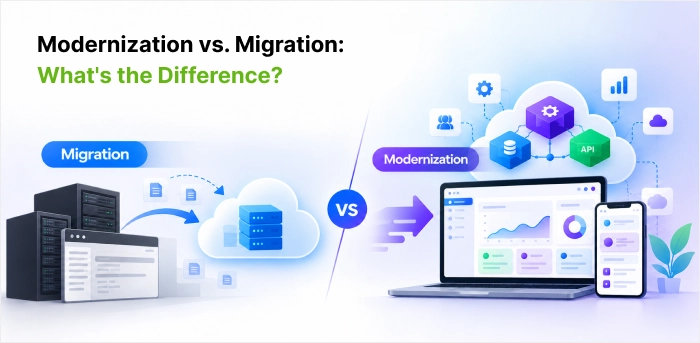
Moving old application to the Claud is not modernization, but it is migration. A changeover happens in actual, in software system. But the system runs with slow releases as earlier, no big impact is observed.
Real modernization goes further. It changes the system inside out. It is built, how it interacts with other tools, and how people use it daily. That might mean breaking a large application into smaller services, opening it up via APIs, or re-working the screens people use most so a task journey takes three clicks rather than ten. Most teams don’t do all of this at once. They change old hardware first, then improve things step by step. And the work never stops, because the business keeps on changing, and so do the people who use the software.
Find some interesting statistics about Legacy software modernization in the next section.
Data Insights
Industries that run on decades-old core systems show how slow and uneven this work can be. In December 2022, Deloitte surveyed 100 chief information officers, or their equivalents, at life and annuity insurers about core-system modernization. Most had already started, but fewer than a third had finished any of their initiatives: 12% had completed all of them and 20% had completed some. Just over two-thirds still had projects underway or in planning. Deloitte found that progress in this sector lags other industries, and that larger insurers were well ahead of smaller ones, many of which had not yet completed a single initiative.
The same study offers two lessons beyond insurance. 61% of respondents said smaller, incremental upgrades are more practical than overhauling everything at once. And the share of insurers planning to upgrade their current core systems doubled from 36% in 2017 to 73% in 2022. In this sector, most organizations are modernizing what they already have, step by step, rather than ripping it out.
These insights indicate that in today’s ever-evolving business scenario, how it is worth to implement legacy software modernization.
6 Signs Your System Needs Modernization
The need for legacy software modernization usually displays in daily issues well prior to anyone uses the concept- technical debt. These signs show the ultimate limitations of old legacy-based business systems, developing major concerns to businesses, wish to be in the market long term.
- Maintenance and licence fees take a bigger take for the IT budget each year.
- The vendor has stopped issuing security patches, or auditors raising compliance concerns under GDPR, HIPAA, or India’s DPDP Act.
- The system slows down / fails to carry out high volume transactions.
- Connecting it to cloud platforms for analytics, mobile apps, or partners involves lots of kludges.
- The code is incomprehensible to all but a couple of people, and those people aren’t going to be around forever.
- Leadership and new business initiatives are demanding AI, automation, or real-time reporting, and it can’t deliver.
6 Key Benefits of Legacy Software Modernization
New technology is the real and typical motive for legacy software modernization. What ultimately matters are what the business can do once the old limits are removed.
- Quick releases – Teams can deliver changes in weeks, because modern code is easier to work with.
- Lower running costs – Old platforms tend to need scarce skills and ageing hardware. This cost a lot. New technologies may help.
- Capacity on demand – Cloud’s infrastructure scales up in line with seasonal peaks and then down again.
- Usable data – Information that was previously trapped in a legacy database becomes available to data analytics, machine learning, and AI tools.
- Easier hiring – Engineers who know the main languages and frameworks are easier to find than those who specialize in legacy stacks.
- Lower security risk: Unsupported software is a common target for breaches and ransomware, which raises the risk of regulatory fines and unplanned downtime.
Legacy Software Modernization Strategies:
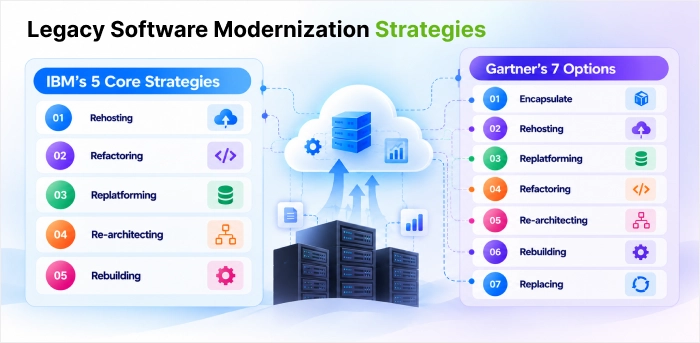
Modernization strategies help teams move legacy software applications to more flexible environments while reducing dependence on outdated infrastructure. They also offer a practical foundation for adopting cloud-native technologies, improving deployment consistency, and supporting microservices where needed.
Let us discuss them in detail for IBM and Gartner platforms respectively.
IBM’s 5 Core Strategies
No single method suits every application. IBM describes 5 core strategies: rehosting, refactoring, replatforming, re-architecting, and rebuilding or full replacement. Each strategy fulfils a different purpose, depending on the application’s condition, business needs, budget, and technical constraints. Some approaches need only minor changes to the current system, while others include redesigning or replacing it fully. Assessing these options supports teams take a practical modernization path without carrying on unnecessary costs or risks.
- Rehosting: Rehosting, also famous as the lift-and-shift approach, includes migrating legacy applications to a new environment, normally a cloud platform, with minimal meaningful changes to the current code and functionality. It’s a suitable choice when a quick shift over is required, but it cannot utilise the full potential of modernization
- Refactoring: Refactoring is the process of restructuring and optimizing current code to improve its performance and retainability without replacing its core functionality. This strategy can be effective for boosting an application’s efficiency.
- Replatforming: Replatforming is moving legacy applications to a different platform or IT infrastructure. This may take up to performance improvements and scalability, but it includes some level of code adaptation.
- Re-architecting: Re-architecting involves a comprehensive redesign of the application’s architecture to meet modern standards. It often requires a phased approach, effectively managing the process while addressing architectural issues.
- Rebuilding: In cases where legacy systems are obsolete, a rebuild may be required. While this strategy offers a fresh start, it comes with the challenge of possible disruptions during the shift over.
Gartner’s 7 Options
Gartner’s options focus on modernizing the application itself. Gartner’s widely cited seven options to modernize legacy systems cover the same ground but split rebuild and replace into separate choices and add encapsulate. Gartner describes in its research on modernizing legacy systems, and the other five are often cheaper, faster and far less disruptive.
The real skill in legacy software modernization is matching each system to the option that fixes its actual problem, not the one that sounds most impressive in a board meeting.
- Encapsulate – Plenty of old systems work perfectly well. They just can’t talk to anything built in the last ten years. Encapsulating fixes that by putting APIs around the system’s data and functions, so a new app or partner portal can use them without anyone touching the core code. It buys time, nothing more, because the old code is still old.
- Rehosting – If your data centre contract runs out in six months, rehosting is probably where you start. The application moves to new infrastructure, usually the cloud, exactly as it is. No code changes, no redesign. That’s also its limit: a slow application in a data centre becomes a slow application in the cloud.
- Replatforming – Replatforming sits one step above rehosting. While the application moves, you fix a few things worth fixing, like handing the database over to a managed service so your team stops patching it at weekends. The business logic is left alone. Small changes, low risk, noticeable gains.
- Refactoring – Some systems have good bones but messy insides. Each small change takes weeks because nobody wants to change the code. Refactoring cleans that up, reorganizing the code without changing User windows. One rule matter more than any other. Here: get automated tests in place first, or you’ll never know what you broke.
- Re-architecting – Re-architecting This is where things get serious. Changes how the application is built, usually breaking one large monolith into smaller services that can be updated and scaled on their own. Nobody sensible does it all at once. You take one business area, move it out, make sure it works, then pick the next.
- Rebuilding – Sometimes the code really is beyond repair, yet what it does still matters to the business. That’s when you rebuild: same scope, written again from scratch on a modern stack. The hardest part isn’t the coding. It’s finding all the rules the old system follows that nobody ever wrote down, and they always exist.
- Replacing – Not every system deserves saving. If it handles something common, like payroll, HR or CRM, a ready-made product will usually do the job better and for less money. You’ll have to adjust a few processes to fit the product. That’s fine. Customizing it until it looks like your old system defeats the whole point of buying it.
Please note that, while IBM’s five strategies offer a high-level view of common modernization approaches, Gartner’s seven options give a broader set of choices, including encapsulation and replacement as distinct paths.
Together, they help enterprises evaluate or assess modernization options based on application complexity, business needs, technical constraints, cost, and risk.
The Strangler Fig Pattern: Modernizing Without Big Changes
The strangler fig pattern, named by software engineer Martin Fowler in 2004, replaces a legacy system one function at a time. New services are built alongside the old application, and traffic for each function moves to the new service once it is ready. The legacy code is then retired piece by piece. The business runs with small issue fixing.
Let us discuss how this pattern is useful in both approaches.
- Applicability In IBM’s approach: IBM treats the strangler fig as a practical way to move from monoliths to microservices. IBM Developer published a dedicated guide in April 2020. It covers when the pattern applies, when it doesn’t, and what it really means for release management. IBM’s legacy modernization page says re-architecting normally needs a phased approach, and the strangler fig is the standard way to run that phasing.
- Applicability In Gartner’s framework: Gartner’s seven options explain what you do to an application: encapsulate, rehost, replatform, refactor, rearchitect, rebuild or replace. The strangler fig describes how you carry out the bigger changes safely, so the two work together rather than compete. In practice, the pattern is mostly used with rearchitect, rebuild and replace, where moving everything at once carries the highest risk. It also builds on encapsulate, because the routing layer sending traffic to old or new components is essentially an API wrapper.
How to Select the Right Modernization Strategy
You should make a list of all the applications that need to be modernized. Before you begin with the modernization, it is crucial to understand each application’s contribution to the business and its problems.
Some applications might provide significant business value despite being older. At the same time, some might raise maintenance costs and hinder business growth, being complicated.
The factors / aspects mentioned below will support you to find out the applications that need to be prioritized, put on hold, or discarded.
- Business value – How much are revenue, customer experience, or compliance depend on this system?
- Technical health – Does the code solid but old dated, or does each change break something unrelated?
- Risk tolerance – Can the business sustain with downtime? If not, consider the strangler fig pattern, where new components gradually take over from old components.
- Time and budget – Rehosting and replatforming are quicker and cheaper than a rebuild, but with smaller long-term gains.
- Vendor roadmap – Does the current vendor still offer a reliable route to cloud, security updates, and AI?
- Team skills – May your people run the target architecture, or will you need outside help?
Once you assess these factors, selecting the right approach becomes easier. Encapsulation can help a stable old application work with new tools. Rehosting or replatforming may be enough, if the main problem is outdated infrastructure.
Even the application is useful but difficult to maintain, consider refactoring or re-architecting it. The code is too tough to fix; rebuilding may be the ideal option. For common functions like payroll or CRM, replacing the old system with a modern solution can make more sense. If an application no longer serving a business requirement, retire it.
A Stepwise Legacy Software Modernization Roadmap
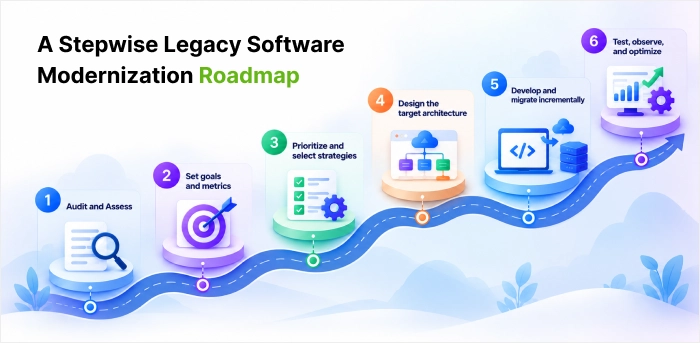
Most successful legacy software modernization programs follow the broad pattern only. They study the infrastructure first, decide for each system, and then deliver in small phases with clear measures.
Here are the required six steps approach for a proposed modernization as per below.
Six Step Journey from Audit to Optimization:
- Audit and Assess – Explain each application, dependency, data flow, security gap, and performance limitation. Score each system on value, cost, risk, and complexity, and consult daily users.
- Set goals and metrics – Define success criteria and metrics by reducing operational costs, fast delivery of new features, higher uptime, or audit ready.
- Prioritize and select strategies – Based on the value/risk scoring, prioritize the systems and select an option from the 7 Rs for each.
- Design the target architecture – Agree on the cloud platform, integration patterns, data architecture, security, and compliance design before coding begins
- Develop and migrate incrementally – Start with an initial module in a low-risk profile to prove the concept, then increase scope in subsequent phases. Always sustain parallel systems if the legacy application supports vital business functions.
- Test, observe, and optimize – Conduct regression, performance, and security testing, check the defined metrics, and use insights to design future iterations.
Common Challenges and Solutions
Even a well-planned legacy software modernization effort meets predictable obstacles. Finding them early may reduce the efforts and time to rectify. With time, to sustain in the target market, every business needs to shift from its older approach and technological stack to the newer one. But this shift over comes with various challenges or bottlenecks to tackle with.
Let us refer here the main challenges and how to handle each of them.
| Challenge | Why it happens | How to handle it (Solutions) |
| Hidden dependencies | Tightly coupled code means one change affects distant features | Break the system into components and expose them via APIs |
| Data migration risk | Data may be lost, corrupted, or duplicated(imitated) during transfer | Clean and map data initially, validate after each change, and keep backups |
| Missing documentation | Business rules often live only in the code or in people’s heads | Run a deep level code audit and involve long-serving staff early |
| Security gaps | Unsupported software and weak authentication | Build in encryption, access control, multi-factor authentication, and monitoring from day one |
| Budget overruns and scope creep | Trying to modernize everything at once | Phase the work and match the strategy to each application |
| Resistance to change | Users are comfortable with current tools | Involve users early, train them, and communicate progress |
Expectations from Legacy Software Modernization Services
Hardly any enterprise does all this alone. That’s where legacy software modernization services come in. A good provider helps with the assessment, the engineering, the migration itself, and the support you’ll need once everything is live.
It starts with the systems you already have. Someone has to dig in and work out how they’re performing, where they break, and what can’t wait. Only then does the right approach become clear. For one company that’s a simple update. For another it’s rebuilding a few parts that keep failing or moving the whole application to the cloud.
The build phase is mostly about getting things faster, keeping data safe, and making sure nothing breaks for the teams still using older tools. Testing matters a lot here. Problems found before launch are cheap to fix, and nobody’s workday gets interrupted.
Launch day isn’t the end, either. Software needs regular care, especially when the business keeps changing around it. Pick the right partner and the whole thing gets a lot easier to manage. You also end up getting far more out of systems you’ve already paid for.
Core Service Areas
- Consulting and audit: code analysis, dependency mapping, a technical debt review, and a roadmap that sets out the expected return.
- Application re-engineering: refactoring or rearchitecting while keeping critical business rules intact.
- Mainframe and COBOL modernization: rehosting, converting, or redesigning older platforms in Java or .NET.
- Data and database modernization: moving databases to the cloud with validation at each stage and as little downtime as possible.
- API enablement and integration: placing REST or GraphQL layers around older back ends so modern applications can talk to them.
- Cloud migration: shifting workloads to AWS, Azure, or Google Cloud with containers and infrastructure as code.
- Security modernization: zero trust controls, modern identity, and encryption that meet regulatory requirements.
- Testing and ongoing support: regression and performance testing, then monitoring, patching, and support under agreed service levels.
When Custom Legacy Modernization Services Make Sense
Packaged products work well for standard functions. They struggle with those systems which are carrying years of company-specific rules. Off-the-shelf tools are fine for routine work. But some systems are what make a company different, or they’re wired into dozens of internal tools, or they have to meet strict industry rules. Those are the cases where custom legacy modernization services make the most sense.
The big advantage of working with a custom software development company is that your teams keep working the way they’re used to. Some projects only need the old application stretched a bit. Others need a full rebuild, shaped around the processes people are used to. The nice part is what happens afterwards: new features don’t mean starting over, because they can be added as modules that sit on top of the modernized core.
How to Select a Legacy Software Modernization Company
Before work starts, first agree upon deliverables, milestones, and measurable performance indicators. These expectations help both parties track progress, manage changes, and keep the project aligned with business goals.
A lot depends on choosing the right legacy software modernization company. Start with the basic questions like:
- Do they have the technical depth?
- Have they worked on systems like yours?
- Do they assess your setup properly before giving a number?
After that, ask how they’ll approach data migration, security, and business continuity, how their pricing works, and what happens once the system goes live. The answers will show whether they’re a fit for both your technical needs and where the business is heading. Look for below parameters:
- A track record with technologies like mainframes, older .NET, or on-premises ERP
- A structured assessment before any fixed quote
- Clear plans for data migration, rollback, and keeping the business running
- Security and compliance experience in your sector
- Open pricing and a flexible way of working
- Support after go-live, including monitoring and maintenance
Legacy Modernization Software and Tools
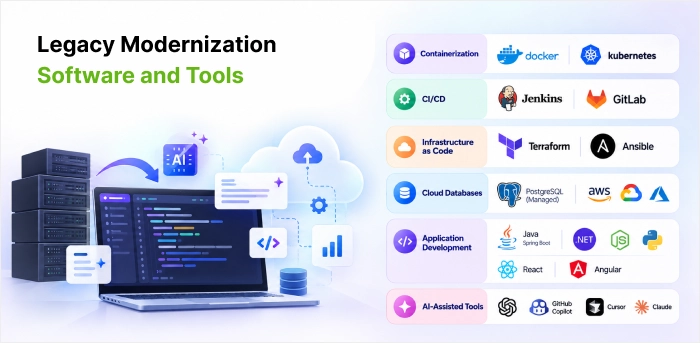
The right legacy modernization software reduces timelines and risk. A typical toolkit includes Docker and Kubernetes for containers, Jenkins or GitLab for CI/CD, Terraform or Ansible for infrastructure as code, and managed cloud databases like PostgreSQL services. On the target side, teams mostly select Java with Spring Boot, .NET, Node.js, or Python, with React or Angular for the front end.
AI-assisted tools now feature in many legacy software modernization projects also. They can read through large codebases, explain logic no one documented, and draft test cases. Experienced engineers still review every change before it delivers.
Modernization Cost
The cost of legacy software modernization varies from one business to another. It depends on the condition of the current system, the changes required, the amount of data to be moved, and the effort involved in connecting the new system with existing applications. Security checks, testing, employee training, and ongoing maintenance also add to the overall cost.
In some cases, businesses may need to run both old and new systems for a period during the transition. Considering these expenses at the planning stage gives businesses a precise picture of the investment required and helps them skip budgeting based on the initial development cost alone.
Once these costs are clear, the next step is to find a modernization partner who can deliver the planned work within the agreed budget and technical requirements.
Choosing the Right Modernization Partner
A partner who can handle the work within those budget limits without overlooking business needs. One must look for experience of this partner, with similar legacy systems, a thorough assessment before work begins, and a practical plan for data migration, security, and business continuity.
The provider must be capable to explain the proposed approach, likely risks, costs, and delivery timelines in plain terms. Before signing off on the project, agree on the expected deliverables, key milestones, responsibilities, and measures of success. This clarity on the project gives both sides a clear understanding of what needs to be delivered and how progress will be examined.
We will throw some light on modernization cost in India in detail here
Legacy System Modernization Services Cost in India
The Legacy System Modernization Services Cost in India depends primarily on the existing system a business already has and what it requires for the improvement. Some businesses may need to update a current application only, on the other side, some businesses need to renew their old software or shift to the cloud or get connected with the new technological tools.
Due to factors like data migration, security needs, system complexity, and the time required to complete the work, cost gets increased. So, without knowing the exact such business requirements, it is hard to fix the pricing.
Before the switchover start, business must know the exact issues with their current systems and what needs to be changed during the shift over. It is worth to consider current maintenance, testing, and future updates, while assessing the Legacy System Modernization Services Cost in India.
Indicative ranges published by Indian providers in 2026:
| Assessment and modernization roadmap | 6 lakh to 18 lakh | Codebase, data and integration review with a ranked plan |
| Replatform | 12 lakhs to 22 lakhs | Database and OS modernization, about 10 to 16 weeks |
| Full replatforming of multi-module ERP or core systems | 1.2 crore to 3 crore | Large programs over 12 to 24 months |
| Rehost (lift and shift) | 8 lakhs to 15 lakhs | One system, no code changes, about 6 to 10 weeks |
| Incremental (strangler fig) migration, mid-size app | 35 lakhs to 1.2 crore | Phased rewrite over 6 to 12 months |
| Scope | Indicative cost (INR) | What it typically covers |
These are planning ranges only. Ask any provider to break its estimate down by these cost drivers, so you can compare quotes.
The engagement model Table:
| Model | Works best for |
| Fixed price | Well-scoped work such as an assessment or a rehost |
| Time and materials | Work whose scope will evolve, such as rearchitecting |
| Dedicated team | Multi-phase programs running 12 months or longer |
Look beyond the first quote. Factor in maintenance, staff training, integration and future enhancements, and compare total cost of ownership over three to five years rather than the build price alone.
Conclusion
The modernization of legacy software allows companies to identify the strengths and weaknesses of their current applications and determine the necessary course of action. By choosing the most appropriate option for each case, instead of getting rid of all the old technologies, the business will be able to operate in the most efficient way. The seven Rs of modernization can be utilized when prioritizing the replacement, rewrite, restructuring, retention, resurfacings of the existing applications and systems.
Finally, to ensure that modernization will be successful, it is needed to examine the current situation and define the strategy, setting the goals. What is more, it should be realized in stages, paying the main attention to the key areas that need to be improved immediately and those that require day-to-day enhancements. In this case, due to sufficient planning and preparation, there will not be any negative consequences for the system, and the cooperation with the expert partner will provide cost reduction and support.
Thus, the legacy software modernization is the key to the success in the IT industry. By taking into consideration the strengths and weaknesses of the existing systems, the company will be able to optimize its IT strategy, time, effort, and cost. Instead of replacing all the existing technologies, it is more efficient to prioritize the critical ones for the creation of a strong foundation for future developments and continuous evolvement in line with the changing business environment.
FAQs
How long does a legacy software modernization project take?
A legacy software modernization project normally takes approximately 3 to 12 months for most mid-sized business applications, via timelines ranging from some weeks to approximately 2 years depending on the selected strategy.
Should we modernize or replace our legacy system?
Apply legacy software modernization when the system holds distinct business logic. Replace it when a dependable market product allows the same job for less. A mix of both is always recommended by many portfolio reviews.
How can we avoid business disruption during modernization?
Yes. The easy way to keep the business running during modernization is to change things a little or phase wise at a time. Tiny, consistent changes for updating can not make big upsets rather than rebuilding large parts of the system in one turn.
What is the difference between legacy modernization and digital transformation?
Legacy software modernization makes current systems updated. It eliminates the technical limits holding them back, offers high security, and makes sure the software fits with daily operations of the business. Digital transformation goes a step ahead by using technology to improve how a business functions and takes decisions. Modernization can just be a part of a broad digital transformation initiative.
What is an example of a legacy application?
An old version of COBOL based banking application still running with Mainframe is a right example of legacy application. Its performance may be satisfactory over the years, but its compatibility with latest software technologies and advanced networking systems is almost none. So, it can be considered as outdated application or system.

 Shaili Gupta

 Ajay Wadne