Key Takeaways
- Begin with a practical use case: Define the users, task, goal, and constraints involved before you choose an agent type, model, or framework.
- Develop the appropriate architecture: A good AI agent is built with an LLM that is augmented with tools, data, memory, workflows, and explained decision-making.
- Prioritise security and guardrails: Restrict tool capabilities, check inputs and outputs, encrypt confidential data, and require human approval for high-risk actions.
- Test before going live: Test the agent on real-world use cases, tool use, accuracy, cost, latency, failures, and safety-not only success cases.
- Monitor and improve continuously: Deployment is only the beginning. Use logs, evaluations, user feedback, and performance data to improve the agent continuously.
Think building a Chatbot was simple? Building an AI that understands goals, plans actions, employs tools, pulls information, performs actions, has recovery strategies, and has termination? That’s another level of engineering. Ever wonder how to build AI agents you can really trust? Begin by understanding that the model is only one piece of the puzzle, not the whole system.
Thinking about how to implement your AI agent concept? From selecting the best architecture and arming your agent with tools and knowledge to building memory and the execution loop, to securing, testing, and deploying it to production, this book will take you through the entire process.
What Does It Take To Build an AI Agent?
Every AI agent has the same foundational ingredients-at the very core, an LLM can be used for reasoning, along with a set of instructions (goals), tools it can use, sources of knowledge to access, and memory for context. Planning to determine which actions it should take, an execution loop, guardrails, evaluation, and observability.
User goal → agent → reasoning/decision → tool call → observation → agent → next action → result
The exact combination of these pieces varies by use case. A simple internal tool might skip long-term memory entirely. A customer-facing agent handling sensitive actions needs heavier guardrails than an internal research assistant. The architecture should follow the problem, not a template.
When Should You Build an AI Agent?
Not every automation problem needs an autonomous agent, and that’s worth deciding before writing any code. If the workflow is fully deterministic, traditional automation is usually enough. If the system mainly needs to retrieve and summarise information, a RAG application often does the job without the added complexity of an execution loop.
Ever been so swamped with choices but didn’t want to take the lead? That’s when you need a copilot. Now, do you find yourself stuck deciding between two options? That’s when an agent is your best friend. You want it to make decisions in the face of multiple steps and have it change strategy as it gains new information. Just one thing: agents can be overkill and are perfect for some problems.
Step-by-Step Process on How to Build AI Agents?
Step 1: Define the Agent’s Goal and Scope
Start narrow. Ever considered working on an AI assistant for customer service? Did your idea look something like “Build an AI assistant”, and did the scope seem too enormous? Focus on the details. To make this happen, start with the details.
For instance, imagine creating an agent that automatically categorises support tickets, finds related product information, writes responses and escalates difficult tickets to a human support agent. Focus on your triggers, inputs, outputs, scope, and goals first. Here’s the catch: scope accurately first, and the rest of the project is doable.
Step 2: Map the Workflow
Document the operation of the process prior to the use of AI, which is parameters like: Time & date of the initial trigger, Decision points, Actions performed, External systems engaged, Human approval triggers, Process breakdowns, and Process terminators. This workflow map becomes the blueprint for the agent’s tools and stopping conditions later.
Step 3: Choose the AI Model
The could be taken into account when choosing models are the reasoning ability, the callability of the model, the context window, the latency, price, output consistency, and privacy or deployment restrictions that the organisation might have. There is no one “best” model; the selection will depend on the workload. For high-throughput, low-complexity tasks, a less complex, cheaper, and faster model may be enough, while complex multi-step tasks may need a more capable model, even with high latency and cost.
Step 4: Choose the Agent Architecture
Common patterns include single-agent, tool-using agent, react-style reasoning loops, plan-and-execute, router-based delegation, supervisor architectures, and multi-agent systems. Start with the simplest architecture capable of solving the problem; a single well-scoped agent handles more use cases than teams initially assume. Multi-agent architecture is worth the added coordination overhead only when the task genuinely spans distinct specialities, a distinction covered in depth in our multi-agent systems guide.
Step 5: Give the Agent Tools
Tool or function calling is how the model turns a decision into an action. The process is such that: the model chooses the tool, the tool executes the specified function, the output is returned, and the agent continues from there.
Tools may connect to APIs, databases, search engines, customer relationship management systems, enterprise resource planning systems, internal systems, calculators, code execution environments, file systems, email systems or scheduling systems.
Each tool needs a clear description, structured inputs, validation, defined permission boundaries, error handling, and a timeout. A tool without those guardrails is a liability the moment the agent calls it incorrectly.
Step 6: Connect Knowledge and Data
Agents base their chain of thought on external sources using Retrieval-Augmented Generation (RAG) (vector databases, structured databases, APIs, enterprise knowledge bases, documents, search engines).
The reason to use retrieval is when there’s unstructured or semi-structured data that needs to be reasoned over, and to use direct access to APIs and databases when structured data is involved and specific questions are asked. In every case, the freshness and quality of the source matter for the trustworthiness of the output.
Step 7: Design Memory and State
Not all agents need that much long-term memory. What needs to be distinguished is context of conversation (relating to the immediate) as opposed to short term memory (state of the process at hand) as opposed to long term or persistent memory (context that persists across sessions).
To last, we need to figure out what to remember, how long, where, who will be able to access it, and when to delete / archive / update it. Unsecurely remembered data may become a matter of cost, latency and privacy over time.
Step 8: Build the Agent Loop
This execution loop is the core of the system goal: decide, act, observe, decide, act, stop. Every loop generates the next plan step, applies a tool, interprets the observation, updates the state, and checks if some stop condition has been met. Build in a maximum iteration limit and explicit error handling from the start, not after the first runaway loop in testing:
while not done and iterations < max_iterations:
plan = agent.decide(goal, context)
result = tools.execute(plan.tool, plan.input)
context = agent.observe(result)
done = agent.check_stop_condition(context)
This is illustrative, not production code, but it captures the shape every real agent loop follows.
Step 9: Add Guardrails and Security
Within this section, generic instructions to each AI agent tend to be vague, and it is also the stage that can fail worst if not executed properly. However, it’s important to have enabled agent authentication and authorisation, least-privilege on every tool, input and output validation, prompt injection awareness, control over sensitive data, limits on tool abuse and over-permission, human approval gates for actions with high impact, rate limits, audit trails, and secrets management.
An agent shouldn’t get unrestricted access to a tool simply because it’s technically capable of calling it. For a deeper breakdown of these controls as architecture components, our enterprise AI agent architecture guide covers the security and governance layer in more depth.
Step 10: Test and Evaluate the Agent
Conventional software testing checks whether code runs correctly. Agent evaluation has to check whether the agent makes good decisions, which is a different question. Cover unit tests for individual tools, integration tests across the full loop, scenario-based tests against realistic tasks, an evaluation dataset, and regression tests before every change ships.
| Metric | What it measures |
| Task success rate | Whether the agent completes the intended task |
| Tool-call accuracy | Whether it selects and calls the right tool |
| Groundedness | Whether outputs are supported by retrieved information |
| Latency | How quickly the task completes |
| Cost per task | Operational efficiency |
| Escalation rate | How often human intervention is required |
Establish a baseline based on your own tests, rather than assuming all users do things the same way.
Step 11: Deploy the AI Agent
When hitting production, you need to add a service layer, use a container or managed runtime, pick a cloud provider, do secrets management, do authentication, do a scaling plan, do a queue for asynchronous needs, have a database for the state, log properly, monitor, apply rate limiting, apply cost control, and do versioning for prompts and tool settings. The right architecture depends heavily on your expected volume and the nature of the producer’s infrastructure; there is no “correct” configuration.
Step 12: Monitor, Improve, and Maintain the Agent
Deployment is not the end. Log every decision, every call, every data point you used; follow failures and user feedback, continually evaluate, and monitor for drift when the model or prompts change. The improvement loop is continuous:
observe → evaluate → identify failure → improve → test → deploy.
Agents that work well at launch can degrade quietly as usage patterns shift or upstream APIs change behaviour.
What is the AI Agent Development Tech Stack?
| Layer | Purpose | Example technology categories |
| Foundation model | Reasoning and generation | LLM providers (evaluated per workload) |
| Agent runtime | Orchestration and execution | Agent frameworks and SDKs |
| Tools | External actions | APIs, functions, internal systems |
| Knowledge | Grounding | RAG, vector databases, structured data |
| Memory | State and context | Databases, memory stores |
| Observability | Monitoring | Tracing and evaluation platforms |
| Deployment | Production runtime | Cloud, containers, serverless |
| Security | Access control | IAM, authentication, secrets management |
Don’t lock down the architecture to a single vendor at each layer – most enterprise builds will combine providers based on their cost, latency, and particular requirements.
What are the Popular Frameworks for Building AI Agents?
- LangGraph provides an explicit graph of states and transitions that represents the agent loop. This helps with understanding and debugging workflows that branch more easily than a prompt-driven loop.
- LangChain offers a lot of tools for chaining LLM calls, retrieval, and tool use. These tools work best when the team needs flexibility in the range of integrations they build.
- The OpenAI Agents SDK provides a focused and streamlined way to build agents that call tools directly from OpenAI models.
- CrewAI focuses specifically on multi-agent collaboration with defined roles, a good fit once a workflow has already outgrown a single agent.
- LlamaIndex specialises in data indexing and retrieval, making it a strong choice when knowledge grounding is the hardest part of the problem.
- Semantic Kernel targets teams building agent capabilities inside a .NET or enterprise Microsoft stack.
The framework decision should be driven by the architecture decision made in Step 4 and not the other way round. With all options, capabilities are changing fast; check the latest documentation for the most up-to-date information.
How Much Does It Cost to Build an AI Agent?
The cost is not one static number; there is a list of components that are part of the overall cost. Model and API use increases with volume and complexity of the task; development hours depend on the number of tools and integrations being built; the costs of infrastructure and vector database scale as use scales, and there are costs of observability, security tooling, maintenance and human review time.
The cost of a working prototype can seem low because there are no guardrails, inspection, evaluation, or a production setup. The cost of production includes this. A rough estimate should be made to assess cost according to the workload rather than a general guess. The range of difference between the prototype and the production cost can be more than most teams expect.
What are the Common Mistakes When Building AI Agents?
Three of the most common early mistakes are: beginning with too broad a use case, having the model selected before the workflow is sketched out, and giving the agent too many tools than it needs to accomplish the task.
Close behind: granting tools excessive permissions, adding memory without a defined purpose, reaching for multi-agent architecture before a single agent has actually been tried, and skipping failure-state handling so the first tool timeout takes down the entire task.
Missing stopping conditions lead to runaway loops. Testing only happy-path scenarios, skipping observability, and treating the prompt as the entire system are three separate ways teams discover their agent isn’t actually reliable, usually in production rather than in testing. First, we have deployed without assessment, neglecting cost and latency until they become issues, and forgetting to include human escalation for dangerous actions.
How to Build an AI Agent: A Practical Checklist
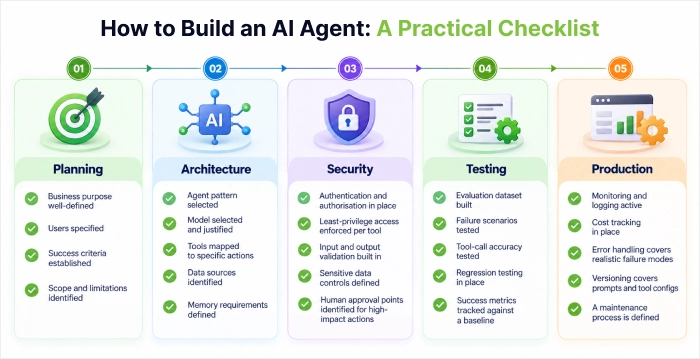
- Planning: Business purpose well-defined; users specified; criteria for success established; scope and limitations identified.
- Architecture: agent pattern selected, model selected and justified, tools mapped to specific actions, data sources identified, memory requirements defined.
- Security: authentication and authorisation in place, least-privilege access enforced per tool, input and output validation built in, sensitive data controls defined, human approval points identified for high-impact actions.
- Testing: evaluation dataset built, failure scenarios tested, tool-call accuracy tested, regression testing in place, success metrics tracked against a baseline.
- Production: monitoring and logging active, cost tracking in place, error handling covers realistic failure modes, versioning covers prompts and tool configs, a maintenance process is defined.
Conclusion
Designing a productive AI agent is frankly a systems-engineering problem, not a prompting problem. All the steps in this doc, whether it’s scoping the target, designing the guardrails, or designing the evaluation, are required since skipping any will often lead to a production failure, not a planning mistake.
Start small; opt for the simplest architecture that can solve the problem. Think about security and testing not as something that should be added on just before shipping but as something to be considered during the development process.
If you need help designing and building an AI agent for your business, Sphinx Solutions is here to guide you through use-case discovery and architecture all the way to development, integration, testing and deployment.
FAQ’s:
How do you build an AI agent?
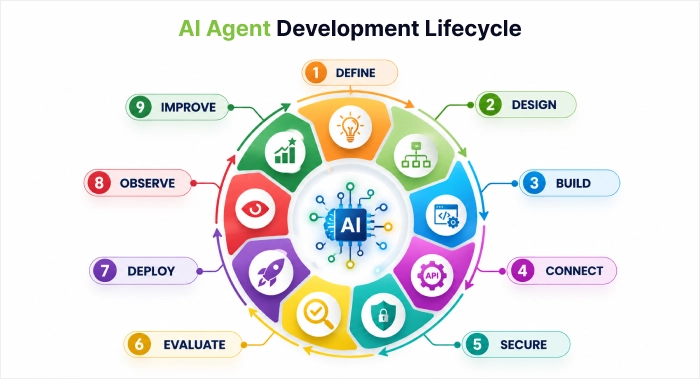
Define a narrow goal and scope, map the workflow, choose a model and architecture, give the agent tools and knowledge, design memory, build the execution loop, add guardrails, test against realistic scenarios, then deploy and monitor continuously.
What are the main components of an AI agent?
The core components are a reasoning model, tools, knowledge sources, memory, a planning or orchestration layer, an execution loop, guardrails, evaluation, and observability, working together rather than any one piece carrying the whole system.
Can I build an AI agent without coding?
Some no-code and low-code platforms let you assemble simple agents through configuration, but production-grade agents with custom tools, guardrails, and enterprise integrations generally require development work.
What programming language is best for AI agent development?
Python is the most common choice given its ecosystem of agent frameworks and LLM SDKs, though JavaScript/TypeScript and .NET are also viable depending on your existing stack and which framework you choose.
Which framework is best for building AI agents?
There’s no single best framework; LangGraph suits complex branching workflows, CrewAI suits multi-agent collaboration, LlamaIndex suits retrieval-heavy tasks, and the right choice follows your architecture decision rather than the reverse.
How long does it take to build an AI agent?
A narrow, single-agent prototype can take a few weeks; a production-grade agent with proper guardrails, evaluation, and enterprise integrations typically takes considerably longer, depending on the number of tools and systems involved.
How much does it cost to build an AI agent?
Cost depends on model usage, development effort, infrastructure, and ongoing evaluation and maintenance; a simple prototype costs far less than a production system with full guardrails and monitoring in place.
What’s the difference between an AI agent and a chatbot?
A chatbot responds to what it’s asked. An AI agent can be given a goal, plan multiple steps, call tools, and take action across systems largely on its own, within defined boundaries.
How do AI agents use APIs and external tools?
Through function or tool calling: the model decides which tool a task requires, the tool executes with validated inputs, and the result returns to the agent to inform its next decision.
How do you test an AI agent before deployment?
By combining conventional software testing with agent-specific evaluation: tool-call accuracy, task success rate and escalation rate, tested against realistic scenarios and failure cases, not just happy paths.


 Shaili Gupta

 Ajay Wadne