

The software developer’s job is to wake up, write a few lines of code, and call it a day. If this is what you think, then it’s the biggest myth. What processes occur behind the scenes to transform an idea into something you can tap, click, or swipe?
The Software Development Life Cycle (SDLC) is an organised approach to software development. If you’ve ever been curious about how software is made, software developers work through a proper coding system to create custom software, websites and platforms.
This blog will explain software development, SDLC, the different models people use, and why modern methods like Agile and DevSecOps are transforming things. If you’re a curious learner, a budding coder, or someone who loves knowing how things work, this blog is for you, too.
What is Software Development?
Software development involves planning, building, testing, and improving computer programs, web applications, and websites. It combines creativity, reasoning, and problem-solving to transform concepts into practical tools for computers, phones, and other gadgets.
Software developers, often known as programmers and coders, are the individuals who perform this profession. They are a major part of a software development company that creates software supporting businesses utilising various programming languages and tools
What is SDLC (Software Development Life Cycle)?
The Software Development Life Cycle contains rules that direct development teams and serve as a software project blueprint. The prime objective of the SDLC is to ensure that software is created efficiently, within budget, on time, and according to user expectations.
When the SDLC comes into effect, teams learn that it’s easier to help one another get things done, reduce errors, and deliver software development services. Setting defined objectives, procedures, and results for every stage of the development process helps the team stay on course and address problems before they become more serious.
One significant advantage of following the SDLC in software engineering is that it guards against unnecessary risks, saves time, and fully manages the available resources. A proper development cycle and adhering to it allow a smoother project flow and better results, whether the team is building a small SaaS solution or an e-commerce enterprise platform.
In simple terms, SDLC is a smart way for software teams to turn creative ideas into working software, all while keeping things on schedule, within budget, and up to the mark. Therefore provide complete software development services at ease.
Importance of Software Development Life Cycle

Managing a software life cycle project has deadlines, changing requirements, new emerging technologies like AI development, and different teams that must stay in sync.
An SDLC process now involves applying various ideas to funnel the software development plan into different project phases, each with activities and outputs ready to be delivered. The coordination thus provided also ensures that the development team, managers, and clients stay on the same page throughout the project.
Here’s why following an SDLC approach is so valuable:
- Clear Framework: It provides a structured plan that outlines activities, responsibilities, and deliverables at each stage.
- Better Project Management: Each phase in SDLC has its own set of tasks and timelines, making it easier to manage and monitor.
- Complete Documentation: Thorough records at every stage make updating, maintaining, and auditing later much easier.
- Early Risk Detection: Requirement analysis and design are two structured steps that help identify possible problems early and lower the likelihood of more serious issues later.
- Easier Project Tracking: When work is divided into phases, progress can be monitored easily, delays identified, and necessary adjustments made.
- Faster Development: Development is accelerated, and preventable errors are decreased in a well-planned procedure.
- Improved Visibility: At any project stage, everyone, including developers, clients, and even managers, is fully aware of what has happened.
- Cost-effectiveness: Early problem detection and resolution save time and money when addressing bugs after development.
- Stronger Client Relations: Client trust is increased by timely deliveries, improved communication, and regular updates.
- Consistent Quality: Standard procedures and thorough testing ensure the finished program meets user expectations.
Phases of Software Development Life Cycle
The SDLC outlines critical stages of software development. SDLC has seven major components: Planning, Requirements Analysis, Design, Development (Coding), Testing, Deployment, and Maintenance.
These SDLC phases include the conceptual and analytical side, and move toward the more practical side of the stages, such as design and code, to maintain ongoing improvement.
All projects go through a similar set of core phases, from testing to fixing bugs to finally launching it for people to use. During the SDLC process, the common errors that are solved relate to poor planning, a lack of some features, or costs incurred with last-minute fixes.
Phase 1: Planning

The first step in the software development life cycle is the planning. In this phase, there will be cooperation among the development team, project managers, and stakeholders who work to specify what should be built and how it will be built.
In the planning stage, information collection is essential to look at the market needs, customer feedback, and existing solutions. It will help to understand the deliverables of the current project. Customer, Business Analysts, marketing teams and Software developers are some important members that can be helpful to gather information.
A detailed software requirements specification (SRS) is prepared to guide the entire project. In this phase, the team estimates the time, budget, and resources required for the project.
Phase 2: Designing

Every feature, screen, and interaction is meticulously mapped out in the design document specification (DDS), a comprehensive sketch. To visualise the software’s appearance and functionality, this comprises wireframes, mockups, and even early prototypes.
Phase 3: Implementation

In the implementation phase, the ideas turn into actual working software. The development team starts writing code based on the design plans made. Now, we have low-code, no-code platforms and AI code assistants helping out, too, but expert developers are still needed here.
The team follows specific coding standards and best practices to ensure everything runs smoothly and is easy to maintain later. Unit testing takes place regularly to catch bugs early before they accumulate.
Phase 4: Testing
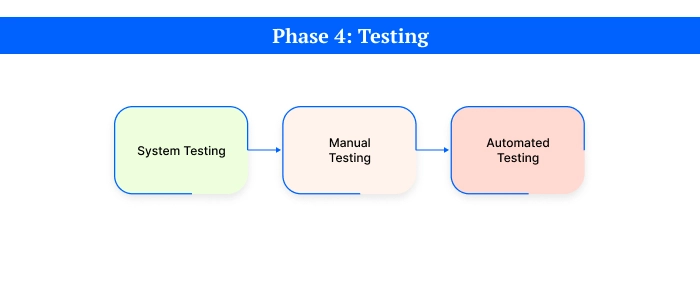
SDLC in Software Testing is one crucial step. It guarantees that the software is dependable, safe, and meets user needs. The program is tested for flaws and bugs using automatic and manual methods.
The QA engineers can conduct two types of testing: manual testing and automation testing. Manual testing is helpful for small projects, but complex projects require automation testing and cannot be handled alone by manual testing.
The QA experts carefully test the applications and report any issues if found. Throughout this phase, different types of testing are carried out, including:
- Unit Testing
- Integration Testing
- System Testing
- Performance Testing
- Security Testing
- Acceptance Testing
Why is this phase so important?
Because it’s the final opportunity to catch and correct mistakes before launching the software. A thoroughly tested product means fewer customer problems, better performance, and higher satisfaction for everyone involved.
Phase 5: Deployment

During deployment, the polished end product passes from the developers into the hands of some real users. The deployment team takes the software’s final build and installs it in the production environment. This may involve system setup, software configuration, packaging APK files, and installation on servers or the cloud.
Sometimes, beta testing or pilot launches are conducted, wherein a limited number of actual users are allowed early access to the software. Feedback from these is invaluable, serving as either a last-minute quality check or an insight into the software’s real-world workings.
The Deployment can happen in two different ways:
- On-premise Deployment: The software is installed on the company’s servers
- Cloud Deployment: The software is hosted online, allowing users to access it from anywhere.
Phase 6: Maintenance

The maintenance phase is the final stage of SDLC. The first step in proper maintenance is to keep the program current and functioning properly.
The maintenance phase is about keeping the software working well. It involves checking how the system is running, fixing bugs or problems, and handling user feedback. Regular updates and new features are added to keep the software safe, useful, and up to date.
Due to the rise of DevOps practices, developers monitor software performance even after the launch. Tools such as Application Performance Monitoring are used to track software health. To maintain the software operating at its peak, it is constantly being checked, enhanced, updated, and refined.
Real-Life Example of SDLC
Building a Banking App Suppose a bank wants to develop an app for online banking. The Software Development Life Cycle (SDLC) assists in making it happen step-by-step in the following ways:
1. Planning and Analysis: First, the team meets with the bank to understand their desired features, like viewing account balances, transferring money, or paying bills. Business analysts note all the needs and prepare a detailed document (called SRS) that explains everything the app should do. This document is then reviewed and approved by both the team and the bank.
2. Design: The approved paper is then given to designers and developers, who begin to plan the app’s look and functionality. Designers look at web pages, while engineers plan the app’s composition and the relationship between its parts.
3. Development: The app has to be built now. To ensure every feature functions properly, developers begin writing the code, creating the webpages, and configuring systems (such as APIs).
4. Testing: The app is put through extensive testing when it is constructed. Testers examine every feature to make sure everything functions as intended and that there are no problems.
5. Deployment and Maintenance: After testing, the app is launched and made available to customers. People can now log in and use online banking services. The exact process will be repeated if the bank wants to add more features.
A Deeper Dive into Popular SDLC Models
While the six phases form the backbone of software development, the way they are executed can vary dramatically. This is where SDLC models (or methodologies) come in. Choosing the right model is crucial for a project’s success and depends on factors like project complexity, requirements clarity, and budget.
Here’s a detailed look at the most prominent SDLC models.
The Waterfall Model
The Waterfall Model is the most traditional and straightforward approach. It’s a linear, sequential model where each phase must be fully completed before the next one begins. Progress flows steadily downwards, like a waterfall.
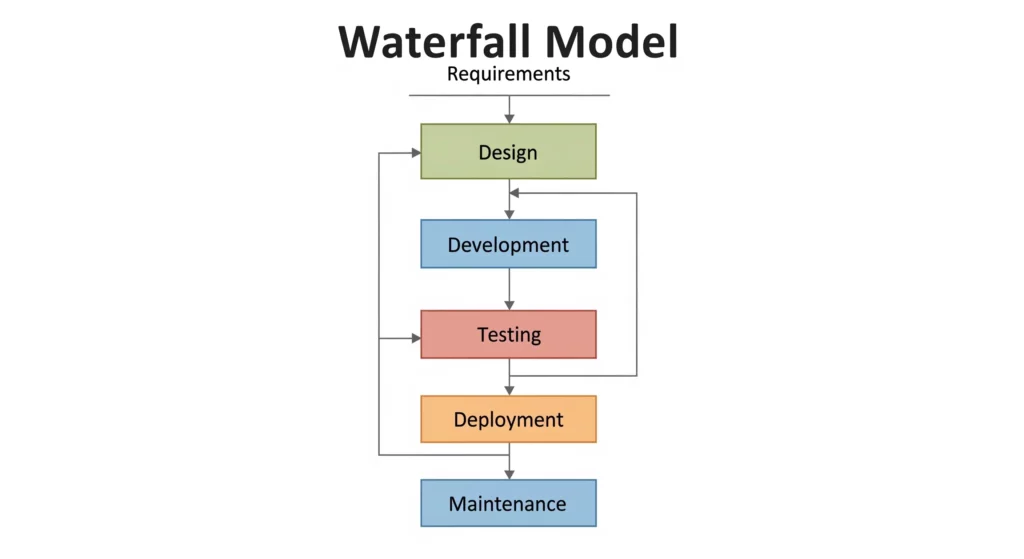
Best For: Small, simple projects where requirements are well-understood, clearly defined, and unlikely to change.
- Advantages:
- Simple to understand and manage.
- Phases are processed and completed one at a time, making it easy to track progress.
- Well-defined stages and deliverables.
- Disadvantages:
- Highly inflexible; it cannot accommodate changes in requirements once a phase is complete.
- The working software is only delivered late in the lifecycle.
- High risk, as testing doesn’t start until after development is finished.
Iterative Incremental Model
The Iterative Model, or the interactive incremental model, is a smart way to develop a software project into smaller pieces called iterations. Each iteration produces a working version of the software. Over time, these versions grow and improve by adding new features, fixing bugs, and refining the software based on potential feedback.
This approach, which uses rigid models like Waterfall, enables teams to develop, test, and enhance software incrementally. However, it follows a more structured path than flexible models like Agile.
At the end of each interaction:
- A working version of the software has been created.
- It’s tested and reviewed.
- Feedback is collected.
- Improvements or new features are introduced in the next cycle
| Pros | Cons |
|---|---|
| Step-by-step progress with each iteration allows steady progress. | Each iteration should be well-planned to avoid wasted effort. |
| Easier risk management as issues are spotted early since testing happens in every cycle. | Early releases might feel incomplete, disappointing clients if expectations aren’t set correctly |
| Client feedback improves future iterations, making the product more user-friendly | Overusing resources due to repeated iterations can lead to delays, scope creep and higher costs |
| Adjustments can be made between iterations without disrupting the entire project | The project is to be closely monitored to avoid unnecessary iterations |
| Each iteration is smaller and tested individually, making catching and fixing problems easier. |
When to use the Iterative Model?
- Medium to large projects where requirements are expected to evolve.
- Projects that require and value user input at various phases.
- Systems that benefit from early prototypes or partial functionality releases.
Agile Model
Agile is not a single model but a philosophy that prioritizes flexibility, collaboration, and customer feedback. It executes the SDLC in small, iterative cycles called “sprints.” Each sprint results in a potentially shippable increment of the product. Popular Agile frameworks include Scrum and Kanban.

Best For: Complex projects with evolving requirements where speed to market and customer feedback are critical. It’s the standard for most modern app development.
- Advantages:
- Highly flexible and adaptive to change.
- Fast, continuous delivery of working software.
- Emphasizes customer collaboration and satisfaction.
- Disadvantages:
- Less predictable due to its adaptive nature, making long-term planning difficult.
- Requires a high degree of collaboration from both the development team and the client.
- Can suffer from “scope creep” if not managed carefully.
V-Shaped Model
The V-Model is an extension of the Waterfall Model where a corresponding testing phase parallels every development phase. For example, Unit Testing is planned alongside the Coding phase, and Acceptance Testing is planned during the initial Requirement Analysis phase.

Best For: Projects where accuracy, reliability, and defect-free delivery are paramount, such as medical or aviation software.
- Advantages:
- Testing is planned and designed early in the lifecycle.
- Reduces defects by focusing on verification and validation at each stage.
- Easy to manage due to its rigid structure.
- Disadvantages:
- Similar to Waterfall, it’s very rigid and not flexible to requirement changes.
- The software is only developed late in the cycle.
Spiral Model
The Spiral Model is a risk-driven model that combines elements of both the Waterfall and Iterative models. The project passes through four phases (Planning, Risk Analysis, Engineering, Evaluation) in an iterative spiral. Each iteration produces a more complete version of the software.

Best For: Large, complex, and high-risk projects where risk management is crucial and requirements are unclear at the start.
- Advantages:
- Excellent for managing and mitigating risks.
- Allows for changes and additions of functionality in later iterations.
- Produces working prototypes early in the lifecycle.
- Disadvantages:
- Can be very costly, as risk analysis requires significant expertise.
- Highly complex to manage.
- Not suitable for small or low-risk projects.
| Pros | Cons |
|---|---|
| Highly flexible, as it easily adapts to changing requirements | The extra amount of planning, risk analysis, and repeated cycles can increase the costs, making it less ideal for small projects. |
| Excellent risk management identifies and handles risks at every stage, reducing surprises later | Regular reviews and risk management take time, which can delay completing simpler projects |
| Helpful when dealing with high-budget, high-risk software systems | Strong project management must run smoothly as it demands experienced managers and organised teams |
| Well-documented process that makes future references easier | Every requirement must be clearly defined before the project begins |
| Each loop helps continuously improve the product based on testing and feedback |
When to Use the Spiral Model?
- Large, high-risk, or huge-budget software projects.
- Projects where requirements are expected to evolve.
- Complex frameworks where managing and analysing risks is of utmost importance.
Big Bang Model
The Big Bang Model is one of the most simplest and least structured approaches in software development. In this method, developers start with little or no planning and jump straight into writing code, expecting the final product to take shape as the project progresses.
This method works best for small, experimental, or scholarly projects where the needs are unclear at first and may change as the project progresses. It’s similar to making something out of nothing; you gather materials, begin construction, and watch what emerges.
| Pros | Cons |
|---|---|
| Simple and easy to execute, requiring minimal planning. | Highly risky as lack of planning can lead to wasted time and resources. |
| Flexible, requirements can change at any time. | Not suitable for large or complex projects due to unpredictability |
| Useful for small projects or proof-of-concept prototypes. | Project costs and timelines are difficult to estimate. |
| Fast initial development since there’s no rigid structure | Final outcomes are often unexpected and may not meet user expectations |
When to Use the Big Bang Model?
- Tiny, academic, or personal projects
- Proof-of-concept projects with undefined requirements
- Experimental or hobby projects where outcomes aren’t critical
- When trying out new technologies without clear objectives
Comparative Analysis of Different SDLC Models
| SDLC Model | Approach | Risk Management | Customer Involvement | Best Suited for | Major Drawbacks |
|---|---|---|---|---|---|
 |
Linear and sequential one-phase must finish before the next phase starts. | Minimal risks addressed late | Low, feedback happens after the final delivery | Small projects with precise, fixed requirements | Hard to handle changes once a phase is completed |
 |
Repeated cycles (iterations), each adding new features. | Risks can be managed early in iterations | Medium, feedback at each iteration | Projects with evolving needs and room for adjustments | Can consume resources if not carefully managed |
 |
Flexible, fast-paced, incremental development through “sprints” | Managed continuously throughout the project | Very high, regular involvement and feedback | Complex projects needing quick releases and frequent changes | Hard to predict costs and timelines, requires active involvement |
 |
Sequential, like Waterfall, but testing happens alongside each development phase | Better than Waterfall due to early testing | Low to Medium, mainly at the final stages | Small to medium-sized projects with fixed requirements | Not suitable for projects with frequently changing needs |
 |
Combines iterative development with a strong focus on risk analysis | Excellent, risks handled at every loop | Medium to High, especially for feedback on prototypes | Large, high-risk, and complex projects | Costly and time-consuming, it requires experienced management |
How Is Security Addressed in the SDLC?
Security checks are typically performed extremely late in software projects, typically during the testing phase, after completing most of the design and development work. Only simple security checks, such as scanning or penetration testing, are then carried out, which may overlook more complex or profound security issues.
DevSecOps and other contemporary development techniques address this. Every step of the software development process, from planning and construction to testing and product launch, incorporates security in DevSecOps.
Nowadays, maintaining the software’s security is the responsibility of all project participants, not just the security team. In this manner, security is integrated into the process rather than being an afterthought.
How to Choose the Right SDLC Model?
Each of the more than 50 SDLC models that have been developed recently has advantages and disadvantages. The type of project, the degree of process flexibility required, and the degree of client and stakeholder involvement desired throughout the process all influence the best SDLC life cycle models to use.
When starting any software project, you should know there is no perfect SDLC model. It always depends on several factors and how much your client is involved.
Before selecting a Software Development Life Cycle model, ask yourself a few important questions:
- Are the project requirements clear or likely to change?
- How big and complex is the project?
- How experienced is your development team?
- Does the client want to be involved throughout the process or at key points?
- Is there a strict deadline and budget?
- How risky is the project?
- Will the product need regular updates and support later?
Your responses to these questions will guide you correctly. Here are the key points to remember before choosing an SDLC model.
- Most projects today mix and match models.
Teams might follow Agile software development life cycle but adopt testing practices from the V-Model, or they might start with Waterfall planning and shift to Agile execution.
- Adapt your model to the project’s current phase.
All stages might be equally important for a brand-new product, but you may only need a few for a minor upgrade.
- Whatever model you choose, always focus on quality early.
Problems are easier and less expensive to repair the earlier you identify them.
- Sometimes switching models helps.
Moving to Agile or V-Model might improve flexibility and quality if your team struggles with deadlines under Waterfall.
- Use modern tools and practices.
Techniques like Continuous Integration, Continuous Deployment, automated testing, and clear documentation improve workflow under any SDLC model.
SDLC models are not rigid guidelines. What counts is how well your team works together, communicates, controls risks, and meets customer needs. The appropriate model arranges the procedure according to your project’s particular needs.
Project Management Frameworks in SDLC
Project management frameworks like Scrum and Kanban are frequently utilised, even though SDLC models aid in directing software development. These frameworks are necessary to plan out daily tasks, monitor advancement, and maintain team productivity.
Let’s understand these frameworks:
Scrum
Scrum is an Agile-compatible framework that breaks work into manageable units called sprints, usually one to four weeks long. It makes regular work planning, development, and review easier for teams.
Key parts of Scrum include:
- Sprint Planning: Setting goals for each sprint.
- Backlog Management: Prioritising tasks and features.
- Daily Standups: Short team meetings to track progress.
- Sprint Reviews & Retrospectives: Examine what worked and what needs improvement.
Jira’s Scrum Board is one tool that helps teams monitor activities, effectively manage each sprint, and visualise their workflow.
Kanban
Kanban is another framework that highlights a steady workflow instead of operating in designated sprints. It’s ideal for projects where priorities change frequently or teams desire a consistent, unbroken pace.
Key features of Kanban:
- Visualising tasks on a board.
- Limiting how many tasks are in progress at once.
- Finding and fixing workflow bottlenecks as soon as possible
Jira’s Kanban Board makes it simple to manage priorities, track task progress, and design custom workflows without overloading your team. Teams often pair Kanban boards with Swarmia’s Jira reporting to better understand cycle times, spot bottlenecks, and maintain a sustainable development pace.
Jira to Manage SDLC Projects
Jira is the most famous tool for managing every stage of the SDLC. This powerful tool supports various models and frameworks, including Scrum and Kanban; some may even say it supports genuine Waterfall model-type approaches. Teams can stay organised, find problems early, and deliver high-quality software on time using a platform such as Jira, especially when leveraging Jira story templates to structure and standardise their work.
Let’s see how Jira can make your project run smoother:
- Scrum Boards: Use them to view tasks in real time and divide work into sprints.
- Kanban Boards: Monitor ongoing projects, set priorities, and avoid bottlenecks.
- Automates routine tasks: Generate rules to change statuses, send messages, and generate tasks automatically.
- Integrate with Other Tools: Connect Jira to Slack, Confluence, and other apps for more efficient collaboration and documentation.
Benefits of Software Development Life Cycle
When building software, jumping without a plan can lead to confusion, delays, and heightened costs. So, SDLC makes a difference by guiding the project from start to finish and covering every important detail.
The benefits of the software development life cycle are listed below:
- Better Project Management: Clear documents that help the project team understand it are kept organised, making it easier to track progress, meet deadlines, and stay on budget.
- Consistent, High-Quality Results: If the SDLC process is followed as required, there is a good chance that the final software meets the quality standards and has fewer chances of any errors.
- Reduced Risks: The process helps to find errors earlier and avoid any delays that lead to more costs.
- Clear Communication and Documentation: Makes sure everyone knows the plan, understands the goals, and can easily track any changes along the way.
- Efficient Use of Resources: Saves time, balances work, and helps the team work well together.
While the benefits of the SDLC are clear, the system is beneficial only when followed. If the teams do not put customers first, skip steps, or do not maintain good communication, the SDLC can become more of a hindrance than a guide. Success in any software project still boils down to good planning, teamwork, and concentration on the user experience.
Risks and Challenges of SDLC
Following the SDLC keeps the structure of software projects organised, but it doesn’t come without challenges. Look at some common risks and pitfalls teams face while working according to the SDLC.
- Misunderstanding Project Requirements: The output may be disappointing if the client’s needs are inadequately addressed and documented.
- Technical Choices: Many IT issues, such as software bugs, hardware faults, or incompatibilities, can impinge on performance and hence delay development.
- Budget and Time Overruns: An unexpected change in cost or scheduling may put the project beyond budget or behind schedule if not controlled.
- Security Risks: The software will be exposed to vulnerabilities and breaches if the right security measures are not observed at every stage.
- Scope Creep: Scope creep occurs when new features are added to the project without a change in timeline or resources. The development team then feels overburdened and the project gets delayed.
- Poor Communication: Vague reporting and poor cooperation among developers, clients, and stakeholders can create confusion that will eventually culminate in disappointment.
Clear communication, frequent reviews, and flexibility when needed can avoid these typical pitfalls and allow projects to proceed smoothly.
Conclusion
The Software Development Life Cycle (SDLC) can offer a certain degree of structure and clarity to the development process. At the same time, it may be used to manage risks, promote communication, and ensure the delivery of high-quality software. SDLC plays a crucial role in streamlining workflows and maintaining standards for a Custom Software Development Company. Just as any process would, it comes with technical difficulties, security threats, and scope creep, not to mention communication problems among all parties involved!
Being flexible, carefully planning, and selecting a model that gels well with the team’s skills and the nature of the project at hand could be critical. No one perfect SDLC model works for every situation. Still, if your choice is well-made and well-operated, it can make the difference in meeting project schedules, budgets, and success criteria.
FAQ’s:
Q1: What are the 7 phases of SDLC?
The 7 phases are Planning, Requirements, Design, Development, Testing, Deployment, and Maintenance. Each stage helps turn an idea into a working, reliable software product.
Q2: What is the most popular SDLC model?
Agile is the most widely used SDLC model today. Its flexibility, faster delivery cycles, and focus on continuous feedback make it a top choice for modern software projects.
Q3: What are the latest SDLC innovations?
Recent trends include DevSecOps for built-in security, AI-powered testing tools, CI/CD pipelines, and cloud-based development platforms to boost speed and quality.
Q4: Which SDLC model is best for my software project?
It depends on your project’s size, budget, and how flexible your needs are. Agile works great for evolving projects, while Waterfall is better for fixed, well-defined plans.
Q5: How can AI improve software development in the SDLC?
AI can automate time-consuming tasks like testing and bug detection, predict project risks, and help developers write better code faster, improving overall project outcomes.


 Souradeep Kundu
 Anand Mahajan
 Shivraj Dhaygude


